How Do You Set Up Automated Competitor Price Monitoring?
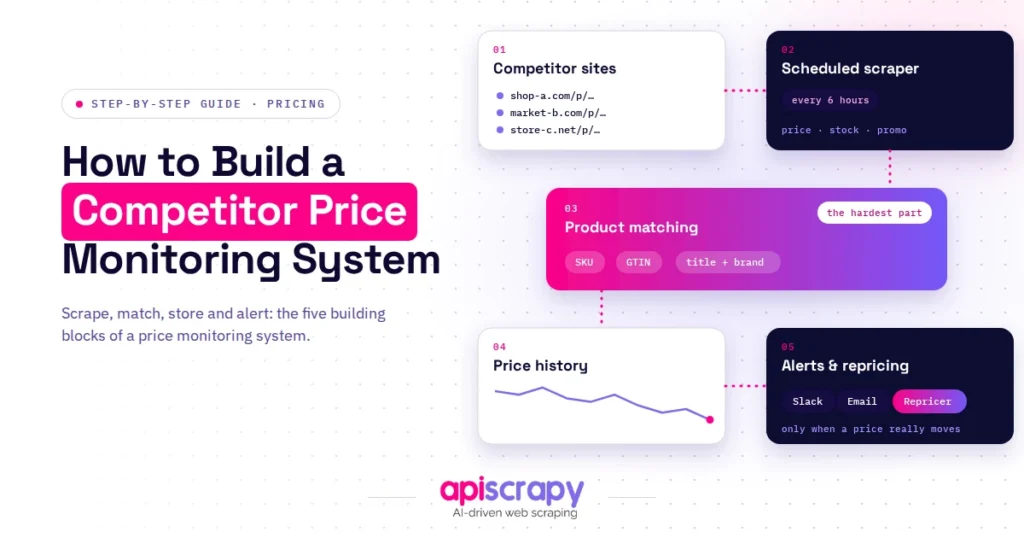
- Pick what to track: Start with direct competitors selling the same or comparable products, plus two or three aspirational names. Prioritize high-revenue SKUs, MAP-restricted products, and seasonal categories.
- Choose build or buy: An in-house system gives full control but leaves you owning every broken scraper and blocked request. A managed service handles anti-bot defenses and scales to thousands of SKUs without extra engineers.
- Store every observation: Save each run as a new timestamped record (product, competitor, price, currency, availability, shipping, source URL) instead of overwriting the old price.
- Automate the tracking: Schedule collection by category volatility, normalize product matches across sites (UPC/GTIN, MPN, then brand and model), and alert only above a threshold of [X%].
- Connect it to pricing rules: Check each flagged change against your margin floor, stock position, and MAP rules before deciding to reprice.
Manual price checks stop working the moment your competitor list grows past a handful of names. Automated competitor price monitoring solves this by collecting rival pricing on a schedule and flagging changes before they cost you the sale.
This guide walks through the setup process step by step, from choosing what to track to storing the data you collect. By the end, you will know how to build a monitoring system that fits your catalog size and technical resources, whether you build it in-house or bring in a monitoring service.
Why Should You Automate Competitor Price Monitoring?
Checking competitor prices by hand works when you track five products across two rivals. It falls apart at fifty products and ten competitors, because prices move faster than a person can refresh a spreadsheet.
Every hour a price change goes unnoticed is an hour you are quoting the wrong number to comparison shoppers. Most online buyers compare prices across multiple sellers before checking out, and a gap of even a few percent is often enough to lose the sale.
Teams that switch from manual spreadsheets to automated monitoring typically describe the same shift: fewer surprises, faster reaction time, and pricing decisions based on current data instead of last week’s snapshot.
Automated monitoring also gives you something manual checks cannot easily provide: historical price data. Instead of seeing only the current competitor price, you can track when prices changed, how frequently they changed, and how your competitors behaved around promotions or seasonal events.
Step 1: Which Competitors and Products Should You Track?
Start with direct competitors selling the same or comparable products, not every company in your industry. Add two or three aspirational competitors whose pricing signals where the market is heading.
On the product side, prioritize by revenue and by category, matching SKUs at the exact product level wherever possible.
- High-revenue and high-visibility SKUs first, since they carry the most exposure to price comparison.
- MAP-restricted products, where unauthorized discounting affects brand positioning as much as your own margin.
- Seasonal or promotion-sensitive categories, where competitor prices move most often.
The scope you set here decides how much monitoring capacity, and what kind of service, you actually need.
What Product Data Should You Track?
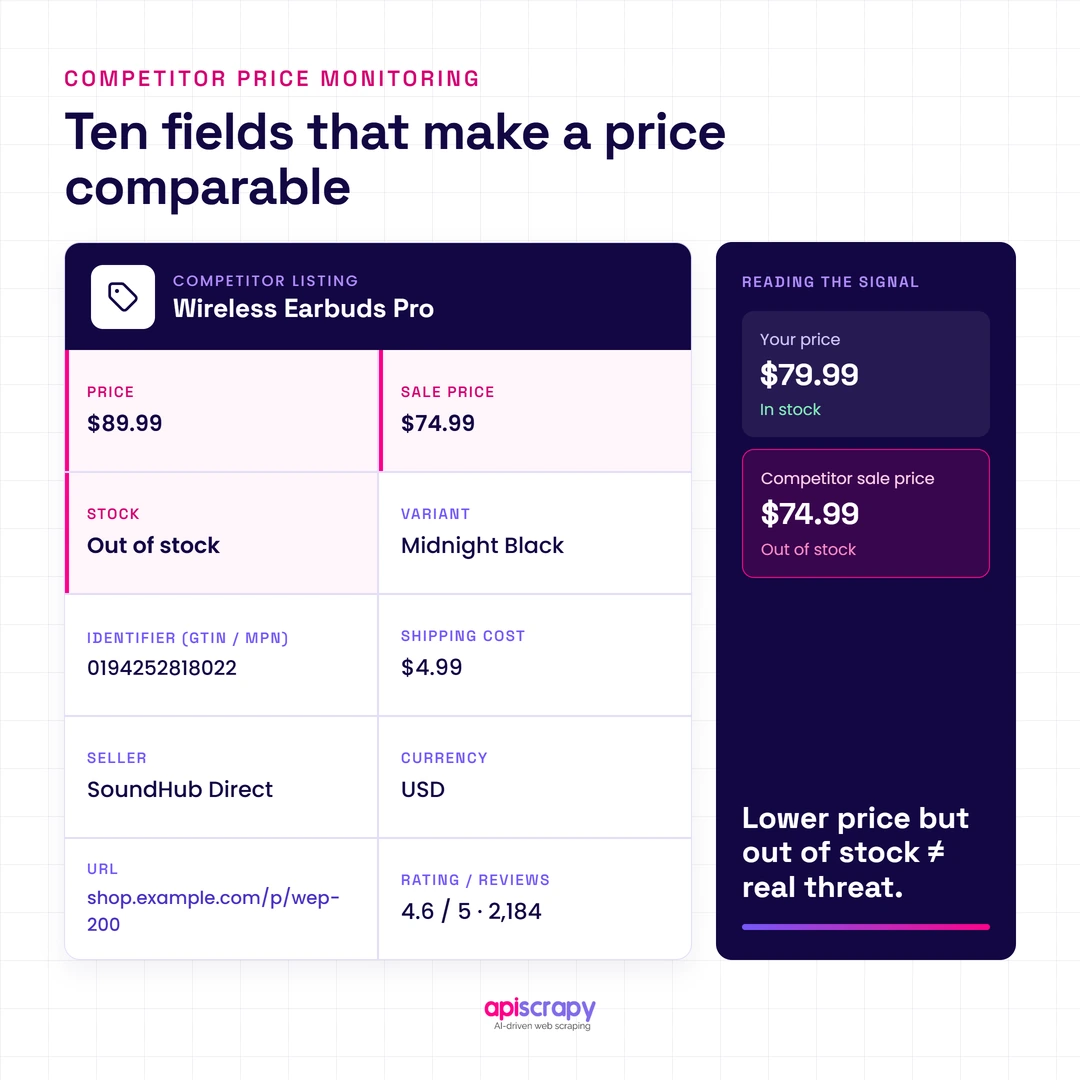
Price is usually the primary signal, but price alone can be misleading.
Depending on your use case, consider tracking:
- Product price
- Sale or promotional price
- Stock availability
- Product variant
- Product identifier
- Shipping cost
- Seller information
- Currency
- Product URL
- Review count and rating
For example, a competitor offering a lower price but showing the product as out of stock represents a different competitive situation from a competitor actively selling the same product at a lower price.
Step 2: Should You Build Your Own Price Monitoring System or Use a Service?
Building in-house gives you full control over scraping logic, matching rules, and storage, and can be inexpensive at a small scale. It also means your team owns every broken scraper, blocked request, and site redesign that competitor pages throw at you.
Using a monitoring service shifts that maintenance burden elsewhere. You get faster setup, built-in handling for anti-bot defenses and dynamic pricing, and support for scaling to thousands of SKUs without adding engineering headcount.
As a rough guide, teams under a few thousand SKUs with in-house technical support can often manage a build. Larger or fast-growing catalogs, and any team without dedicated engineering time, may find a managed service easier to operate.
What Should You Consider Before Building?
An in-house system typically needs several components:
- Data collection workers
- Proxy management
- Browser automation for dynamic websites
- Product matching and normalization
- Database or data warehouse
- Scheduling
- Retry and error handling
- Price-change detection
- Alerting
- Monitoring and scraper maintenance
The initial implementation may be straightforward. The ongoing maintenance is usually where the workload grows, particularly when multiple competitor websites use different page structures, APIs, JavaScript frameworks, or access controls.
When Does a Managed Service Make Sense?
A managed service can be useful when:
- You monitor many competitor websites
- Your catalog contains thousands of SKUs
- Competitor websites frequently change
- Multiple sites require browser rendering
- Your team does not have dedicated scraper engineering resources
- You need monitoring and historical data without building the infrastructure yourself
The decision should ultimately be based on total operating cost and required reliability, rather than initial development cost alone.
Step 3: How Do You Store Price Data and Automate the Tracking?
A spreadsheet works for a handful of products, but it breaks down once you need historical trends or multi-market comparisons. Move to a proper database or a purpose-built pricing datastore as soon as tracking exceeds what one person can maintain manually.
- Automation itself needs four pieces working together:
- Scheduled data collection, timed to how fast prices actually move in each category.
- Normalization, so the same product is recognized across different competitor sites and formats.
- Threshold-based alerting, so small, meaningless price flickers do not trigger noise.
- Integration with your own pricing or repricing logic, so a detected change can trigger a decision, not just a notification.
Done well, this turns raw competitor data into a live feed your pricing team can act on the same day a change happens.
A Simple Price Monitoring Data Model
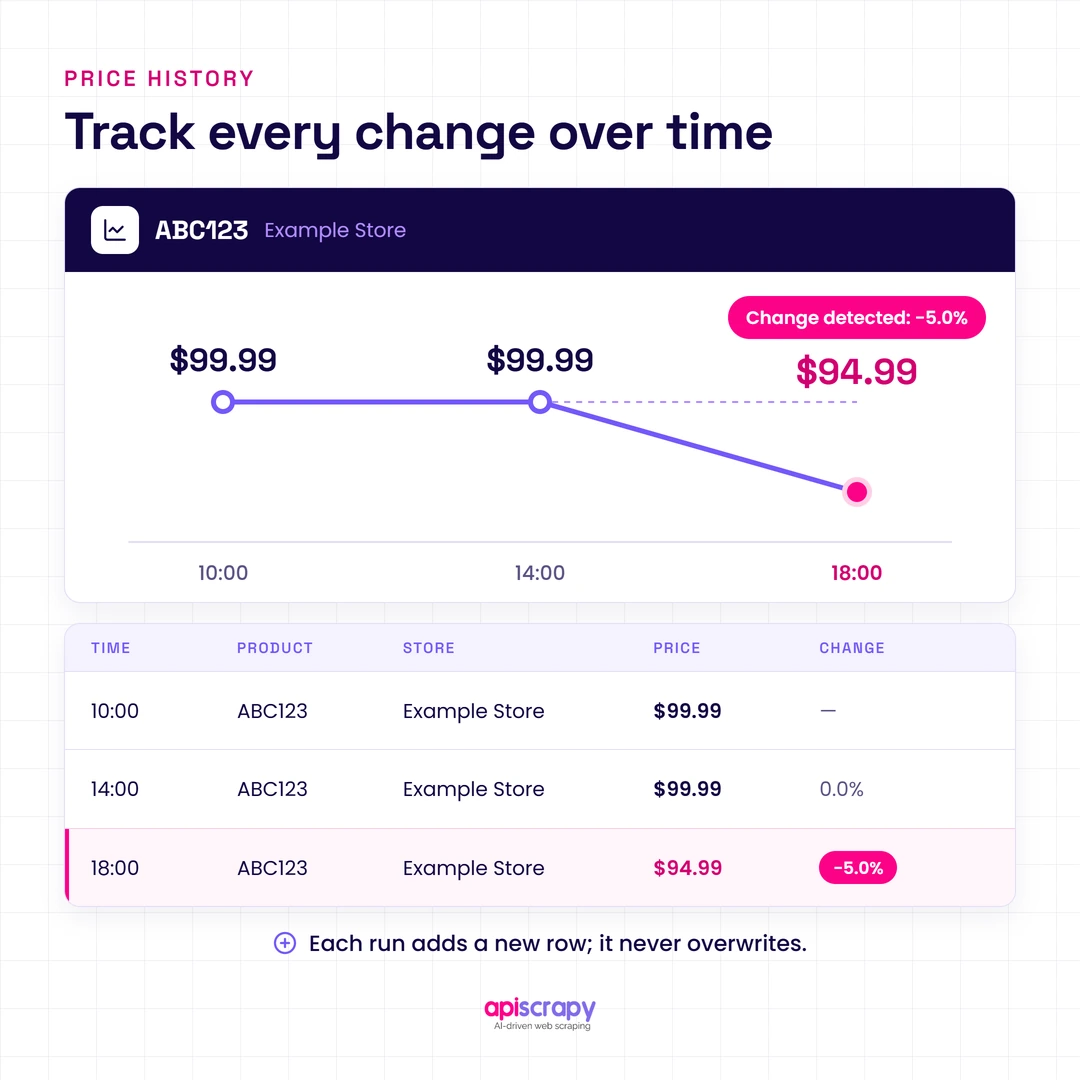
A historical price record could contain fields such as:
- product_id
- competitor_id
- competitor_product_id
- price
- currency
- availability
- shipping_cost
- captured_at
- source_url
Each monitoring run creates a new observation rather than simply overwriting the previous price.
For example:
Product: ABC123
Competitor: Example Store
- 10:00 → $99.99
- 14:00 → $99.99
- 18:00 → $94.99
This makes it possible to identify the actual price change and maintain a historical record for analysis.
Detecting Price Changes
A simple change-detection process can compare the latest observation with the previous observation:
previous_price = 99.99
current_price = 94.99

if current_price != previous_price:
    change = current_price - previous_price
    change_percent = (change / previous_price) * 100

    print(f"Price changed by {change_percent:.2f}%")
In production, the comparison should also account for currency, promotions, availability, shipping costs, and temporary changes so that normal fluctuations do not generate unnecessary alerts.
How Can You Get the Most Out of Competitor Price Tracking?
- Tier your catalog by priority and check fast-moving categories more often than stable ones.
- Set change thresholds around 2 to 3 percent to filter out routine fluctuations from real repricing.
- Combine competitor price data with your own margin data before deciding to react.
- Track stock availability alongside price, since an out-of-stock competitor changes the pricing picture too.
- Review coverage regularly, since competitor catalogs and product lines shift over time.
Don’t Treat Every Price Change as an Action
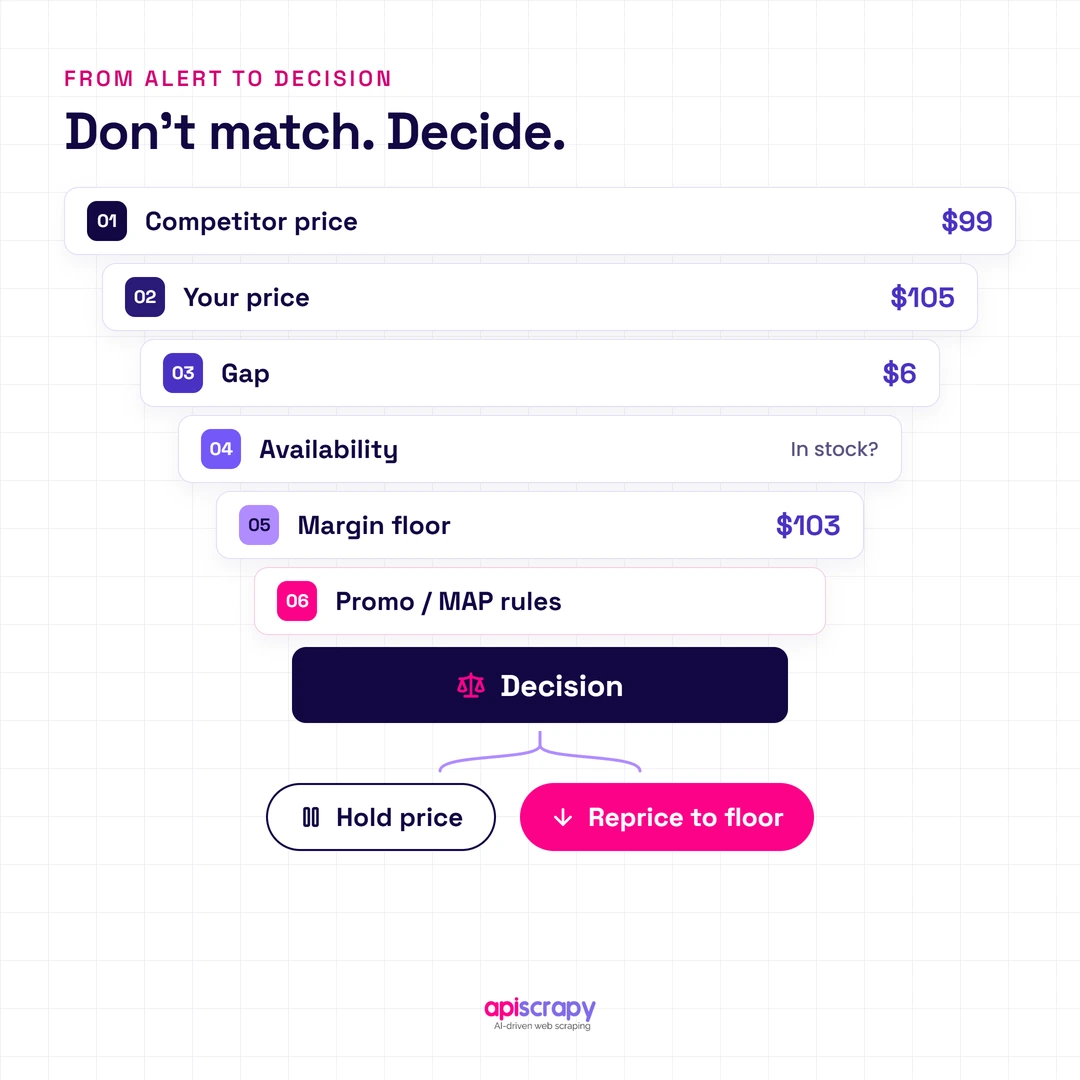
A price monitoring system should provide information for a pricing decision, not automatically assume that every competitor change requires a response.
For example:
- Competitor price: $100
- Your price: $105
- Your margin floor: $103
- Competitor drops to: $99
The system should flag the change, but whether you move your own price depends on your margin requirements, inventory position, pricing strategy, and the competitor’s availability.
This is why connecting competitor price data with your own business rules is more useful than simply sending an alert every time a number changes.
How Can Automated Price Monitoring Services Make Your Life Easier?
A monitoring service takes over the parts of this workflow that consume the most engineering time. Scraper maintenance, anti-bot workarounds, and data cleaning happen behind the scenes instead of on your team’s backlog.
That leaves your pricing team free to focus on strategy: which SKUs to reprice, where to hold firm, and where a competitor’s move is a signal rather than a threat.
A managed monitoring workflow can typically bring together:
- Competitor data collection
- Product matching
- Price normalization
- Historical price tracking
- Availability monitoring
- Change detection
- Alerts
- Data delivery
The exact capabilities vary by provider, so the important thing is to evaluate the service against your actual competitors, SKU count, update frequency, and data requirements.
How Can PriceLeap Help You Monitor Competitor Prices More Easily?
PriceLeap is built for teams that need reliable MAP monitoring and competitor price intelligence without maintaining scraping infrastructure themselves. It tracks pricing across competitor storefronts and marketplaces, matches products at SKU level, and flags violations and changes as they happen.
The advantage is speed from setup to insight: instead of building and maintaining scrapers, you get a working monitoring feed and can start using it for pricing decisions right away.
That makes it a strong fit for brands managing MAP compliance and retailers scaling past what a spreadsheet or an internal script can handle.
Before adopting any monitoring service, it is still useful to evaluate the coverage and accuracy against your actual product catalog and target competitors.
Conclusion
Automated competitor price monitoring turns a slow, manual chore into a live feed you can act on the same day. The right setup depends on your catalog size, your team’s technical bandwidth, and how fast prices move in your category, not on a single universal answer.
Whether you build in-house or bring in a monitoring service, the goal stays the same: know where you stand in the market before a competitor’s price change costs you the sale.
Book a demo with APISCRAPY to see how automated price data collection can power your competitor monitoring setup from day one.
FAQs
How Do You Make Sure Competitor Price Monitoring Data Is Accurate?
Use threshold rules to filter routine fluctuations, verify matches at the SKU level, and re-check flagged changes before acting on them.
You should also monitor the extraction process itself. A scraper can return technically valid data while still extracting the wrong product, missing a price field, or reading a promotional price incorrectly.
Useful quality checks include:
SKU or product-identifier validation
Price format validation
Currency validation
Availability validation
Duplicate detection
Sudden price-change detection
Missing-field monitoring
Periodic re-checks of flagged changes
How Do You Match the Same Product Across Different Competitor Websites?
Match on identifiers like UPC, MPN, or brand and model name rather than product titles alone, since titles vary by seller.
Where available, use a hierarchy of matching signals:
UPC / EAN / GTIN
Manufacturer part number (MPN)
Brand + model number
Product attributes such as size, color, or variant
Product title as a supporting signal
Product matching is particularly important when monitoring multiple retailers because the same product may have different titles, descriptions, URLs, or variant structures on each website.
How Often Should Competitor Prices Be Checked to Catch Important Changes?
Check fast-moving categories like electronics multiple times a day, and check stable categories daily or weekly.
The correct frequency depends on how quickly prices typically change in your market.
For example:
Product Category
Example Monitoring Frequency
Fast-moving electronics
Multiple times per day
Consumer goods
Daily
Stable products
Several times per week
Highly promotional products
More frequent monitoring
Rather than using one schedule for every product, tier your catalog based on price volatility, revenue importance, and competitive sensitivity.
What Hidden Costs Should You Consider When Choosing a Competitor Price Monitoring Tool?
Watch for per-SKU or per-market pricing that scales sharply as your catalog grows, and factor in the cost of handling sites that block automated checks.
Also consider:
Additional proxy costs
Browser-rendering costs
Historical data storage
API or data-delivery fees
Additional markets or regions
Higher monitoring frequency
Product matching
Data validation
Engineering time
Scraper maintenance
Monitoring and troubleshooting
The headline subscription price does not always represent the total cost of operating a price-monitoring workflow.
How Do You Turn Competitor Price Changes Into Actionable Pricing Decisions?
Pair competitor data with your own margin floor so alerts trigger a decision, not just a notification, and route flagged changes to whoever owns that category's pricing.
For example, a pricing workflow can evaluate:
Competitor price
↓
Your current price
↓
Price difference
↓
Competitor availability
↓
Your margin floor
↓
Promotion / MAP rules
↓
Pricing decision
This turns competitor monitoring from a reporting system into an input for your pricing process.
The objective is not simply to know that a competitor changed its price, but to understand whether that change requires action for your business.