How to Scrape from Dynamic Pages? A Practical Guide
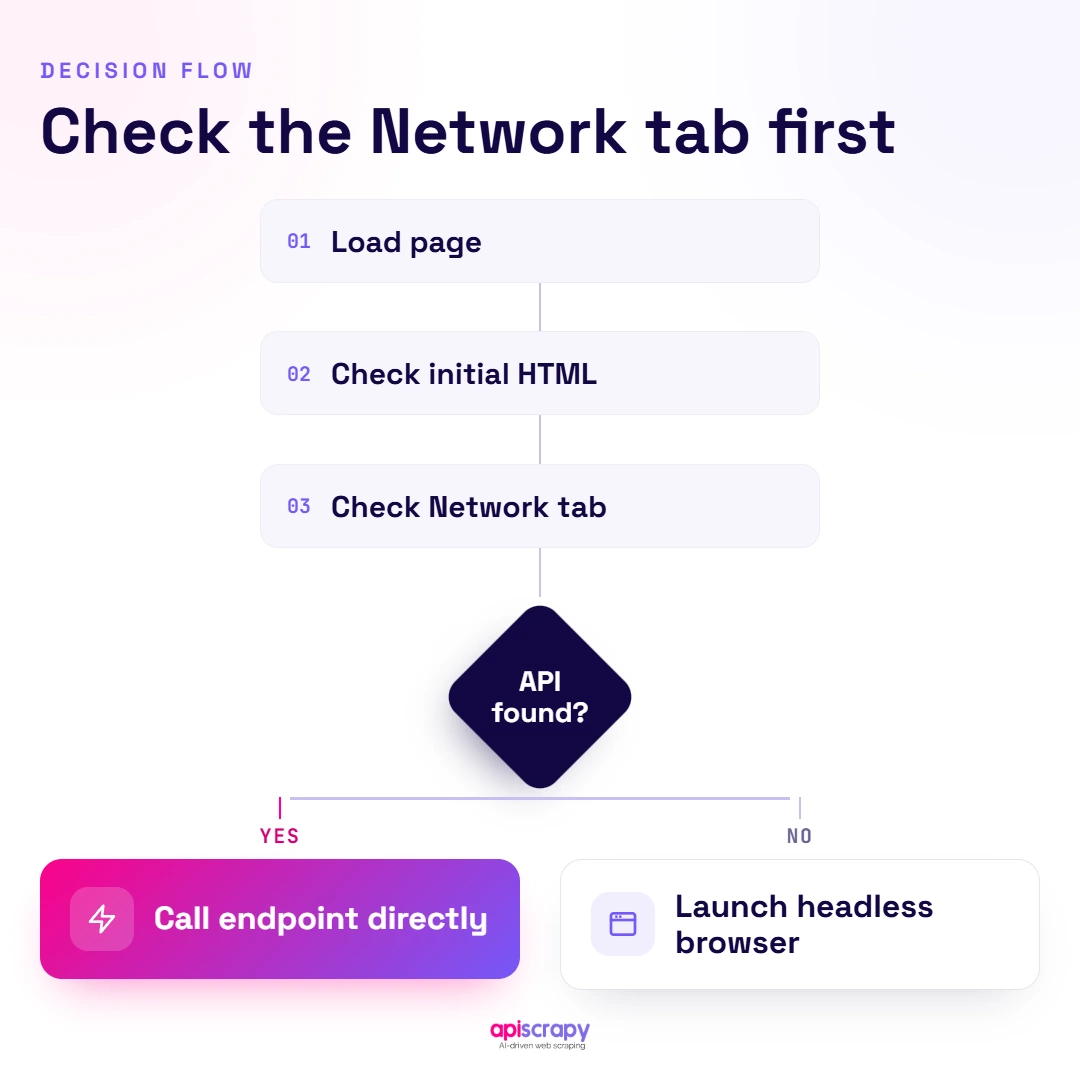
- Before you Scrape Dynamic Pages with browser automation, check the Network tab first. Many seemingly complex websites quietly fetch their content through clean JSON APIs, and identifying those requests can save hours of development. Calling the underlying endpoint directly delivers structured data faster, reduces browser overhead, and can eliminate an entire automation setup.
- Playwright is a practical default for new projects. It handles auto-waiting and network interception natively, removing many timing issues, while Puppeteer suits lightweight Chromium-only jobs and Selenium fits legacy or broad-language needs.
- Wait for selectors, never guess with fixed delays. Fixed sleeps waste time or fail under slow network conditions, while waiting for a specific element to appear scales more reliably across different page speeds.
- Dynamic sites raise the bot-detection stakes. The same JavaScript engine that renders content can also fingerprint automated browsers, so user-agent management, proxy rotation, and reasonable delays can matter more here than on static pages.
- The setup work is ongoing, not one-time. Keeping a scraper running as sites change their JavaScript and detection methods takes continuous engineering time, which is one of the maintenance burdens a managed service like APISCRAPY can absorb.
Modern websites are far more than static HTML pages. Product prices, customer reviews, property listings, search results, and other valuable information are often loaded dynamically after JavaScript runs in the browser, making traditional HTTP requests ineffective for capturing the complete page. This is where the ability to Scrape Dynamic Pages becomes essential. Instead of simply downloading the initial HTML, browser-based scraping tools such as Playwright and Puppeteer can open a page, execute its JavaScript, wait for dynamically generated content, and interact with elements just as a real user would. By rendering the page before extracting information, these tools make it possible to collect richer and more accurate data from modern, JavaScript-heavy websites, turning content that once seemed hidden behind interactive interfaces into structured, usable data for analysis, monitoring, research, and automation.
This guide walks through how to identify dynamic content, choose the right headless browser tool, and build a working Python scraper without getting blocked. Every technique here comes from actual scraping work, not just documentation.
- How to spot dynamically loaded content before writing a single line of code
- Which headless browser tool fits your project (Selenium, Playwright, or Puppeteer)
- A working Playwright script you can adapt immediately
- Practical tactics to avoid getting blocked by anti-bot systems
This is a practitioner’s guide built from real scraping projects handling JavaScript-heavy sites at scale, including e-commerce and pricing data feeds.
What Is Dynamic Web Scraping?
Dynamic web scraping is the process of extracting data from pages where content loads after the initial page request, typically through JavaScript, AJAX calls, or client-side frameworks like React or Vue.
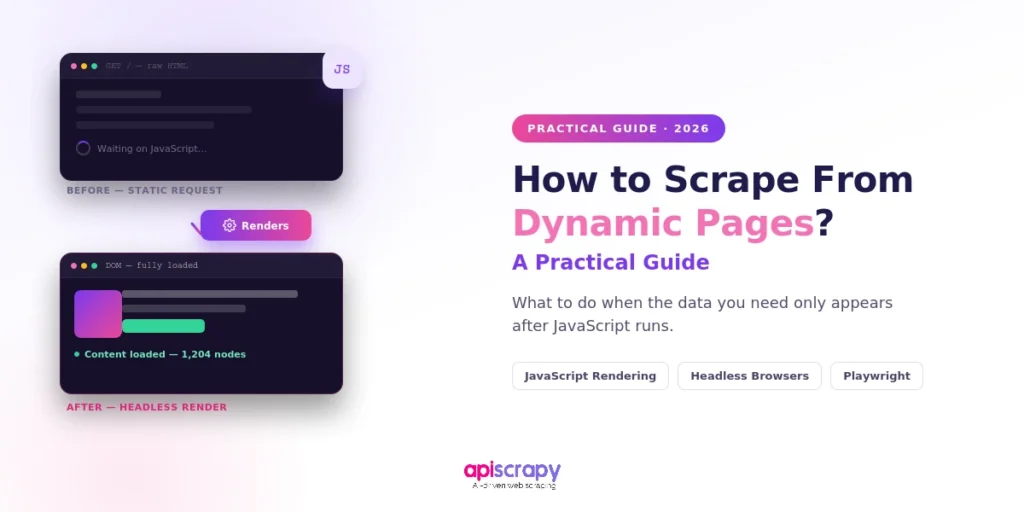
Static scraping works by pulling raw HTML and parsing it directly. Dynamic scraping needs an extra step: rendering the page in a browser first so the JavaScript actually executes and populates the content.
A common example is an e-commerce category page where prices load a second after the page appears, or a social feed that only shows new posts once you scroll down. If you fetch the raw HTML in these cases, the price field or the feed items simply will not exist in the response.
Step-by-Step Process to Scrape Dynamic Pages
Step 1: Check the Network Tab (The “Cheat” Code)
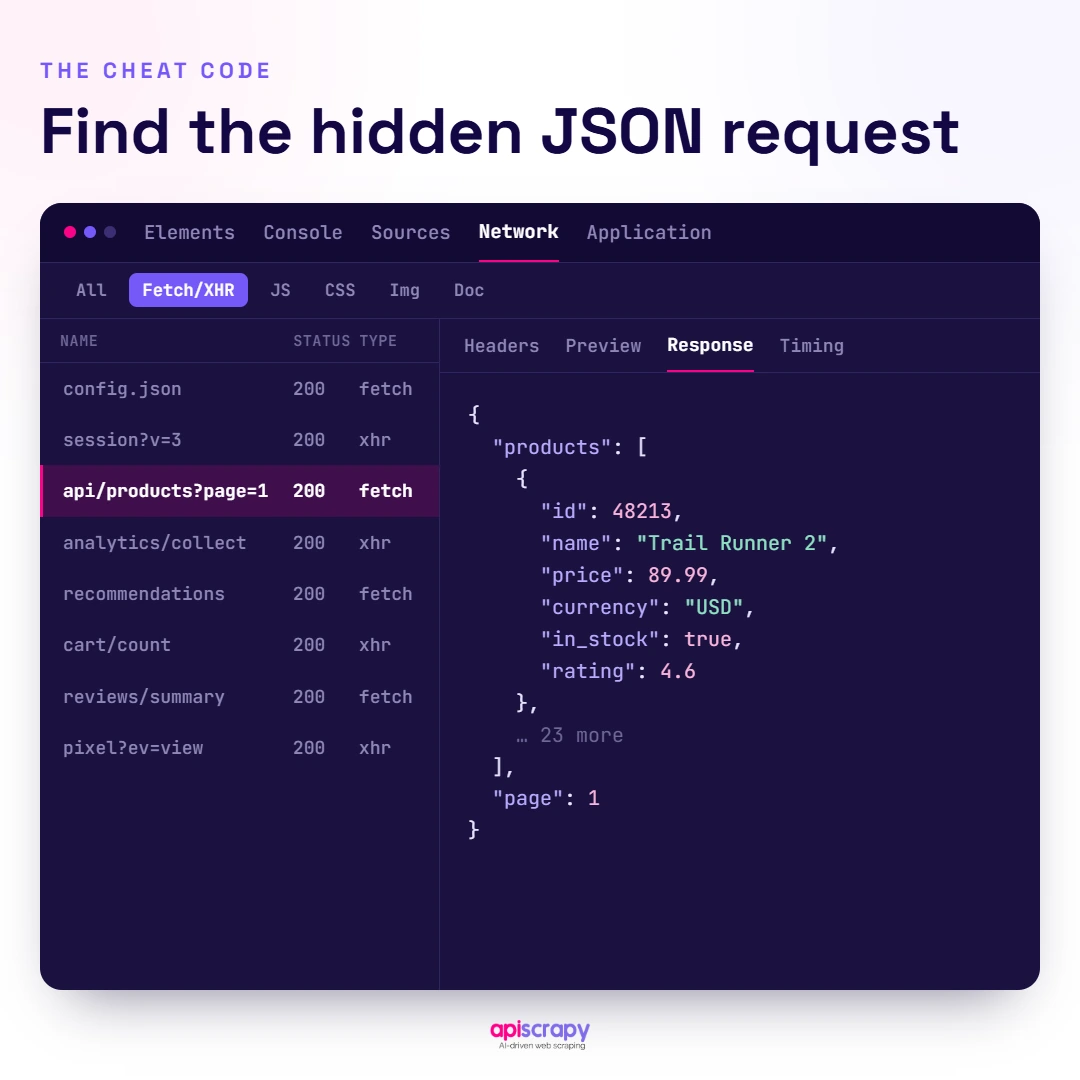
Before reaching for a headless browser, open Chrome DevTools and check the Network tab. Many sites that look dynamic actually pull data from a clean JSON API behind the scenes, and if you can call that API directly, you skip browser rendering entirely.
- Open DevTools, go to the Network tab, and filter by Fetch/XHR
- Reload the page and watch which requests fire as content appears
- Click a request and inspect the Response tab for structured JSON
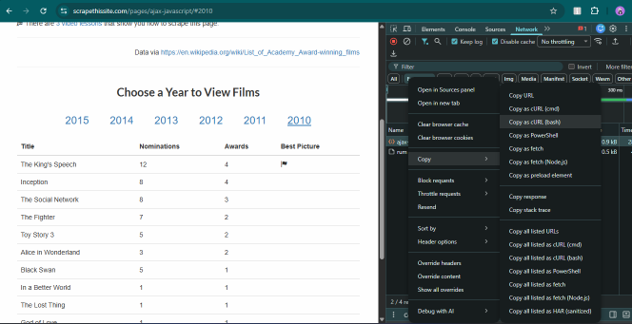
- Right-click the request and copy it as cURL to replicate it in your scraper
If you find a JSON endpoint returning the exact data you need, you can often replace an entire browser automation setup with a few requests calls. This is the fastest path when it works.
What to Check in the API Request
Before reproducing an API request, check:
- Request URL and HTTP method
- Query parameters
- Request headers
- Cookies or session information
- Request payload for POST requests
- Pagination parameters
- Response structure
- Whether authentication is required
For example, a browser request might look conceptually like:
import requests

response = requests.get(

"https://example.com/api/products",

params={"page": 1, "category": "laptops"},

headers={

"Accept": "application/json",

"User-Agent": "Mozilla/5.0"

},

timeout=30

)

data = response.json()

print(data)
The important point is that the browser is not always where the data lives. Sometimes the browser is simply making API requests and rendering their responses.
When a stable and accessible endpoint exists, using the endpoint directly can be faster, cheaper, and easier to maintain than browser automation.
Step 2: Select a Headless Browser Tool
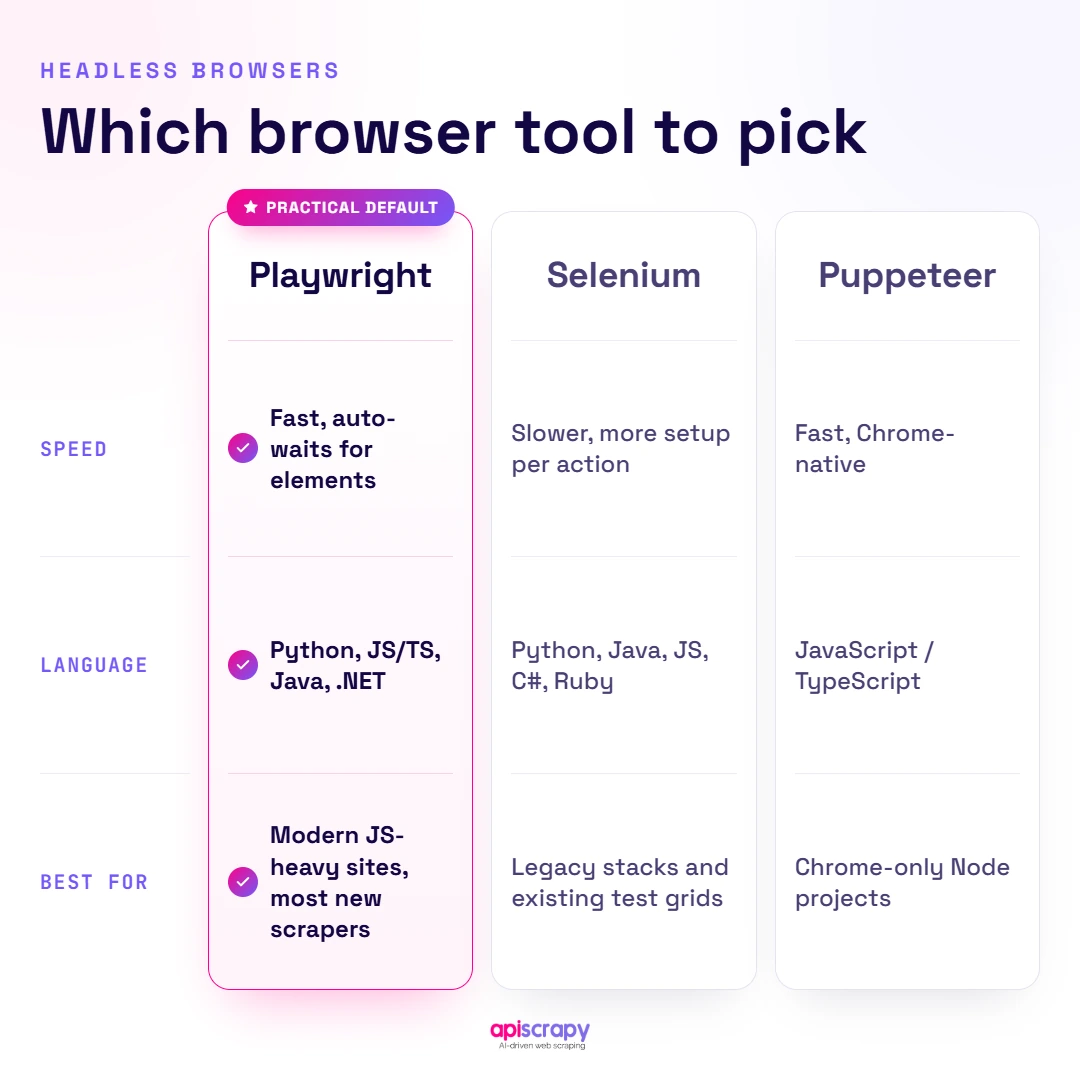
When no clean API exists, you need a tool that renders JavaScript the way a real browser does. Three tools dominate this space, each with a different tradeoff.
- Playwright: fast, modern, strong built-in waiting and network interception, supports Chromium, Firefox, and WebKit
- Puppeteer: lightweight and fast, but limited mostly to Chromium-based browsers
- Selenium: the oldest and most widely supported across languages, but slower and more verbose to set up
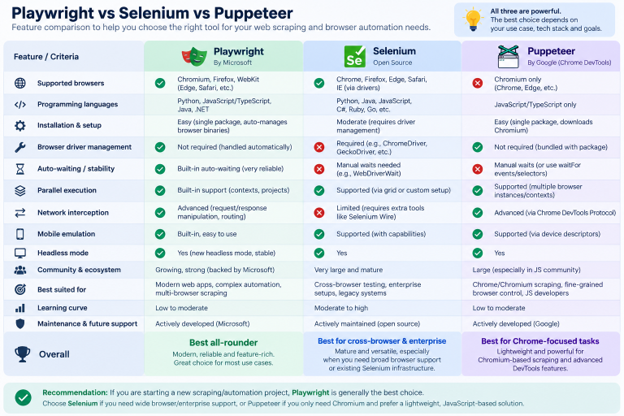
For new Python projects, Playwright is often a practical choice because browser automation, waiting, and network interception are available through one API.
The choice should still depend on the browser engines, languages, existing infrastructure, and compatibility requirements of your project.
Step 3: Implement Core Dynamic Scraping Tactics
Once you have a browser tool selected, the actual scraping logic depends on a handful of recurring tactics.
Wait for a specific selector to appear instead of using a fixed sleep, since fixed delays waste time or fail under slow network conditions
Handle infinite scroll by scrolling in increments and waiting for new elements to load between each scroll
Intercept network requests directly to grab JSON responses instead of parsing rendered HTML
Execute custom JavaScript inside the page when data is buried in a variable not reflected in the DOM
Account for iframes and shadow DOM separately, since standard selectors do not reach inside them by default
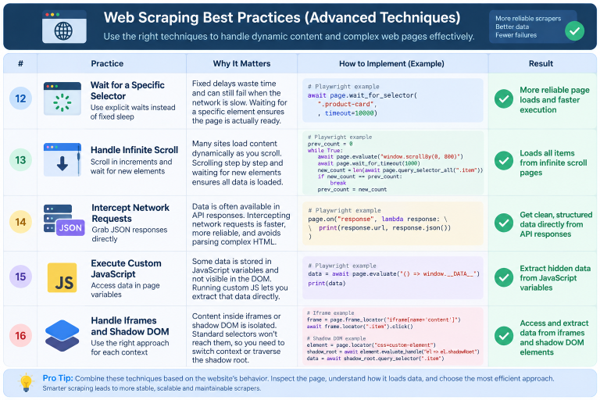
Wait for Specific Elements
A quick example of waiting for a selector instead of guessing a delay:
await page.wait_for_selector(

".product-price",

timeout=10000

)
This is preferable to something like:
time.sleep(5)because the scraper does not need to wait five seconds when the element becomes available after one second, and it does not necessarily fail simply because a slower page takes longer than expected.
Handling Infinite Scroll
For pages where content appears after scrolling, use incremental scrolling and check whether new content has appeared:
previous_count = 0

while True:

current_count = await page.locator(".product").count()

if current_count == previous_count:

break

previous_count = current_count

await page.mouse.wheel(0, 1000)

await page.wait_for_timeout(1000)
In production, it is better to combine this with a more explicit stopping condition, such as detecting that the page height or extracted element count has stopped changing.
Handling Iframes
If the required content is inside an iframe, the main page DOM may not contain the elements you are looking for.
With Playwright, you can access a frame separately:
frame = page.frame(

url=lambda url: "example.com/embed" in url

)

if frame:

price = await frame.locator(".product-price").text_content()
The exact approach depends on how the iframe is created and whether it is same-origin or otherwise accessible to the browser context.
Handling Shadow DOM
Modern websites may also use Shadow DOM components. In those cases, the visible element may not appear in the normal DOM hierarchy in the way a traditional CSS selector expects.
Playwright provides locator support that can work across many shadow DOM structures:
price = page.locator(

"product-card .product-price"

)
The key is to inspect the actual rendered structure before assuming that a standard selector against the page DOM will work.
Step 4: Python Code Example (Using Playwright)
Here is a minimal, working example that launches a browser, waits for dynamic content, and extracts it.
from playwright.sync_api import sync_playwright

with sync_playwright() as p:

browser = p.chromium.launch(headless=True)

page = browser.new_page()

page.goto("https://example.com/products")

page.wait_for_selector(".product-price")

prices = page.locator(".product-price").all_text_contents()

print(prices)

browser.close()
The script launches a headless Chromium instance, navigates to the target page, waits until the price elements exist in the DOM, then pulls the text from every matching element before closing the browser.
For production systems, browser lifecycle management should be handled carefully. Reusing browser instances and contexts where appropriate can avoid the overhead of launching a completely new browser process for every URL.
Step 5: Dodge Anti-Bot Defenses
Dynamic sites are more likely to run bot detection because the same JavaScript engine that renders content can also fingerprint automated browsers.
- Rotate user agents so requests do not all present the same browser signature
- Use residential or rotating proxies, since repeated requests from one IP get flagged quickly
- Randomize delays between actions instead of clicking or scrolling at fixed, robotic intervals
- Use browser configuration techniques that reduce obvious automation fingerprints where appropriate
- Respect reasonable rate limits, since aggressive request volume is one of the easiest bot signals to detect
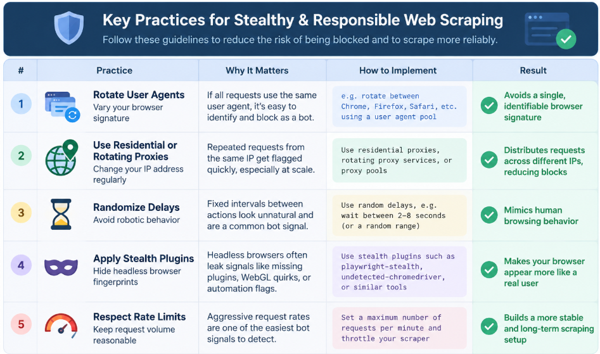
A common Playwright stealth setup is:
from playwright_stealth import stealth_sync

stealth_sync(page)
However, anti-bot systems change frequently, so no single stealth technique should be treated as a permanent solution.
A more reliable production approach combines appropriate browser behavior, reasonable request rates, proxy management where required, error handling, monitoring, and site-specific adaptations.
Respect Site Rules and Access Boundaries
Anti-bot handling should not replace responsible crawling practices.
A production scraper should:
- Respect applicable website terms and access restrictions
- Avoid excessive request volume
- Respect authentication boundaries
- Handle rate-limit responses appropriately
- Avoid repeatedly requesting resources that are not needed
- Monitor failures instead of continuously retrying blocked requests
The goal is to build a scraper that remains reliable without generating unnecessary load or repeatedly hammering a site that is refusing access.
Quick Recap
Check the Network tab first, choose a browser tool when rendering is actually required, wait for selectors instead of relying on arbitrary sleeps, intercept network calls where possible, and use appropriate proxy and browser-management strategies on protected sites.
How Do You Scrape Dynamic Websites With Playwright?
Playwright scrapes dynamic websites by launching a real browser engine, letting the page’s JavaScript execute fully, and then reading the rendered DOM or intercepting the underlying network calls.
It handles auto-waiting for elements natively, which removes most of the timing bugs that plague older scraping scripts, and it supports intercepting requests and responses directly inside your script.
Useful Playwright Techniques
- Use page.route() to block unnecessary resources such as images and fonts when they are not required
- Use page.on(“response”) to capture API responses as they happen, without waiting for the DOM
- Handle pagination by clicking “next” and waiting for the new selector to replace the old one
- Take a screenshot mid-scrape when debugging why a selector is not matching
For example, to inspect API responses:
page.on(

"response",

lambda r: print(r.url)

if "api/products" in r.url

else None

)
This can help identify whether the page is retrieving the required data from an API rather than generating it entirely inside the DOM.
How Would I Know That Data Is Dynamically Created?
The fastest way to tell is to compare the page source with what you see rendered in the browser. If the text you want is visible on screen but missing from view-source, it was added by JavaScript after load.
- Disable JavaScript in browser settings and reload the page to see what disappears
- Check the Network tab for XHR or Fetch calls firing after the initial page load
- Search the raw page source (Ctrl+U) for the text you need and see if it’s absent
- Watch for loading spinners or skeleton placeholders, which usually indicate content is still loading
- Compare the initial HTML with the rendered DOM in browser developer tools
Browser extensions that diff the raw HTML against the rendered DOM can automate this check if you’re auditing many pages at once.
A useful rule is:
If the information appears only after JavaScript executes, an HTTP client alone may not be enough.
However, that does not automatically mean you need browser automation. Always check the Network tab first to determine whether the browser is simply fetching the data from an accessible API.
Selenium vs Playwright vs Puppeteer for Web Scraping
| Tool | Language Support | Speed | Best For |
|---|---|---|---|
| Selenium | Widest (Python, Java, C#, Ruby, JS) | Slower | Legacy projects and broad browser/OS coverage |
| Playwright | Python, JS/TS, Java, C# | Fast | New projects needing speed and built-in anti-detection |
| Puppeteer | JavaScript/TypeScript | Fast | Chromium-only projects, lightweight Node.js stacks |
For many new projects, Playwright is a practical choice because of its speed and native handling of waits and network interception. Puppeteer remains suitable for lightweight Chromium-focused Node.js jobs, while Selenium remains relevant where broad language or legacy browser support matters more than speed.
The correct choice ultimately depends on the existing application stack, browser requirements, team expertise, and scraping workload.
Start Building Your Web Crawler Today
Conclusion
Scraping dynamic pages comes down to three things: detecting how the content actually loads, picking a browser tool that matches your project, and handling anti-bot defenses without getting your requests blocked.
Setting all of this up correctly, and keeping it running as sites change their JavaScript and detection methods, takes ongoing engineering time that most teams would rather spend elsewhere.
APISCRAPY handles dynamic rendering, anti-bot evasion, and scaling as a managed service, so you get clean structured data without maintaining scraper infrastructure yourself. Book a demo to see how it handles your specific pages.
FAQs
How do we handle login-required dynamic content when scraping?
Automate the login once with a headless browser, then save the session cookies or storage state for reuse. Reloading a saved session across runs avoids repeated logins that can trigger bot detection.
For example, Playwright can persist browser state:
context = browser.new_context(
storage_state="auth.json"
)
You should also make sure the account and data being accessed are authorized for the intended scraping activity.
How can a dynamic scraper be prevented from breaking?
Avoid brittle selectors like auto-generated class names and use stable attributes such as data-testid instead. Add monitoring that flags empty extracted fields so layout changes are caught within hours, not days.
For production scrapers, monitor:
Extraction success rate
Empty or missing fields
HTTP error rates
Selector failures
Browser timeouts
Response times
Unexpected changes in extracted data
This turns scraper maintenance from discovering a problem after a customer notices missing data into detecting it as soon as the extraction behavior changes.
How is JavaScript-rendered content scraped?
Use a headless browser like Playwright, Puppeteer, or Selenium to let the page fully render before reading the DOM. Check the Network tab first though, since many pages pull from a JSON API that can be called directly without rendering.
The general decision process is:
Check whether the required data exists in the initial HTML.
Check the Network tab for API requests.
Use the API directly when an appropriate endpoint is available.
Use a headless browser when JavaScript rendering is genuinely required.
Wait for specific elements rather than relying on arbitrary delays.
Is it possible to scrape a website's API instead of the webpage?
Yes. When an appropriate API endpoint is available and accessible for your use case, it can be significantly lighter than rendering the entire webpage.
API responses are generally structured, easier to parse, and require fewer browser resources.
Find the endpoint via the Network tab and inspect the required headers, parameters, cookies, pagination, and request method before reproducing the request with a standard HTTP client.
For example:
import requests
response = requests.get(
"https://example.com/api/products",
params={"page": 1},
timeout=30
)
response.raise_for_status()
data = response.json()
How is data captured after scrolling on a page?
Simulate scrolling in increments, pausing after each to let new elements load. Stop once page height or element count stops changing, signaling all content has loaded.
For example:
previous_count = 0
while True:
current_count = await page.locator(
".product"
).count()
if current_count == previous_count:
break
previous_count = current_count
await page.mouse.wheel(0, 1000)
await page.wait_for_timeout(1000)
Stop once the page height or extracted element count stops changing, signaling that additional content may no longer be loading.
For more reliable production scraping, combine the scrolling logic with explicit selectors, maximum scroll limits, timeout handling, and monitoring so a page that continuously loads content cannot cause the scraper to run indefinitely.