What Is Web Data Extraction & How to Extract Data from a Website?
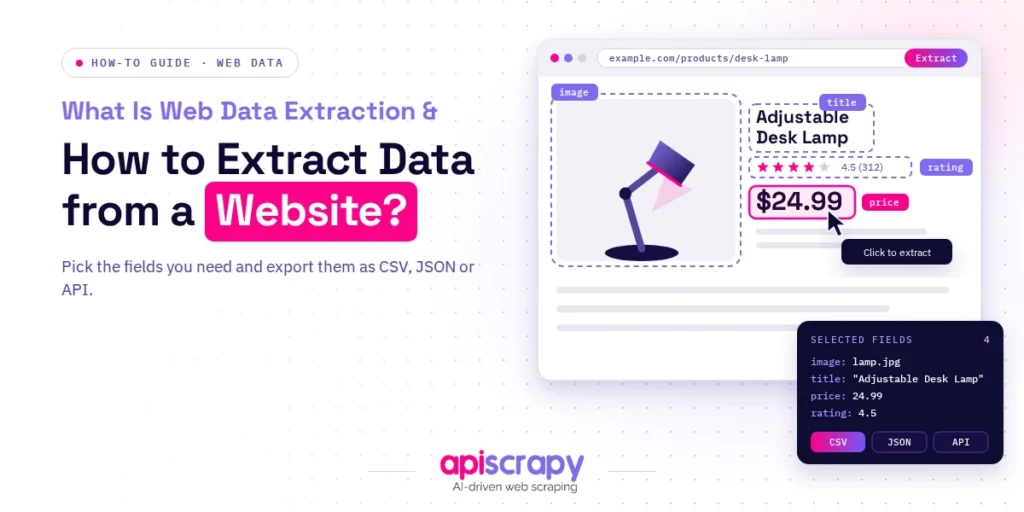
- Web data extraction turns website content into structured data, such as CSV, JSON, or a database, so you can stop copy-pasting and start analyzing.
- With code: inspect the page, choose Requests and BeautifulSoup (static) or Playwright (dynamic), clean the output, then save it.
- No API: parse the HTML, automate a browser, or call the JSON feed the page already uses.
- No developer: use a browser extension for small jobs, or a managed web scraping service like APISCRAPY for scale.
- Stay safe: public data is often permitted, but terms of service, robots.txt, and privacy laws still apply.
- Save your time: hand off maintenance once fixing broken scrapers costs more than the data is worth.
Every website is a database in disguise. Prices, listings, reviews, and contact details sit on public pages, but they rarely arrive in a spreadsheet-ready format.
This guide explains web data extraction, shows how to extract data from a website with code, and compares no-code options, use cases, and legal considerations.
How this guide was prepared:
- Hands-on testing of code-based and no-code extraction methods on real websites
- Practitioner experience from data collection projects across ecommerce, real estate, and market research
- Review of official documentation, robots.txt standards, and public court rulings
- Comparison of each approach by skill level, scale, and maintenance effort
Disclosure: APISCRAPY is our managed web scraping service, and it is mentioned in this guide alongside other approaches.
Our goal is simple: help you choose the right way to extract web data, whichever route you finally take.
What Does Web Data Extraction Mean?
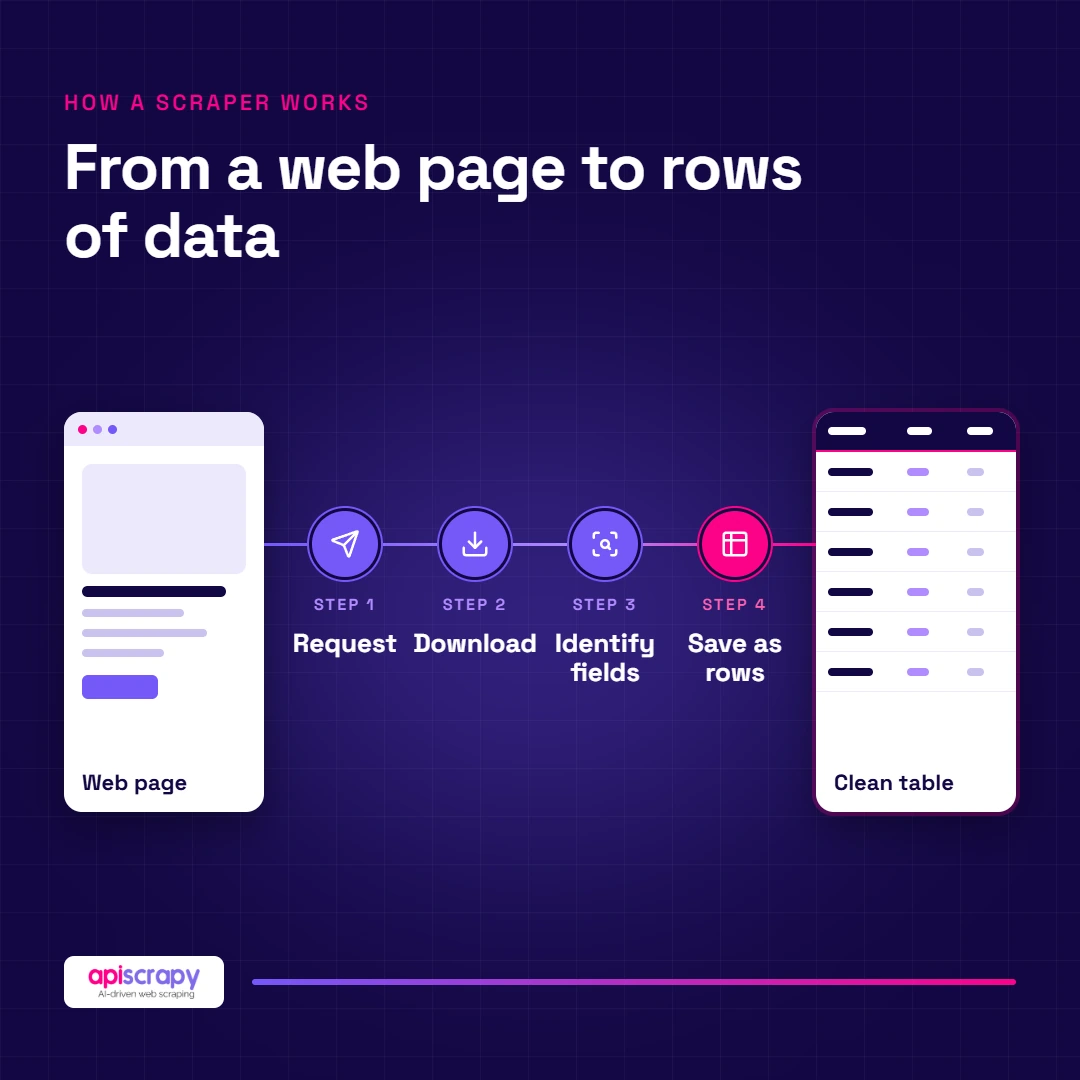
Web data extraction is the process of collecting information from websites and converting it into a structured format, such as a spreadsheet, JSON file, or database. It is often called web scraping, though extraction also covers APIs and managed data services.
Here is how it works in four moves: a request is sent to a page, the page content is downloaded, the relevant fields are identified, and the results are saved in rows and columns.
Commonly extracted data includes:
- Product names, prices, and availability
- Business listings and contact details
- Property listings and job postings
- Customer reviews and ratings
- Articles, headlines, and other text content
Businesses do this because manual copy-paste breaks down after a few dozen pages. Structured web data feeds faster, better-informed decisions on pricing, sales, and research.
How to Extract Data from the Web with Code
Coding gives you the most control over what you collect. Whatever language you use, the process follows the same four steps.
Step 1: Inspect the Website Layout
Before writing a line of code, open the page in Chrome, right-click the data you want, and choose Inspect. Developer tools show exactly where each field lives in the HTML.
- Note the tags, classes, or IDs that wrap each data point
- Check whether the data is in the page source or loaded later by JavaScript
- Look for pagination patterns and read the site’s robots.txt file
Step 2: Choose the Right Code Approach
Match the approach to the website’s complexity and the size of your project.
- Static pages: Python with Requests and BeautifulSoup is fast and light
- Dynamic pages: Playwright or Selenium controls a real browser and waits for JavaScript to render
- Large crawls: Scrapy handles queues, retries, and concurrency across thousands of URLs
Here is a minimal Python example for a static page. It uses books.toscrape.com, a practice site built for scraping:
import requests

from bs4 import BeautifulSoup

import pandas as pd

url = "https://books.toscrape.com/"

headers = {"User-Agent": "Mozilla/5.0 (compatible; research-bot/1.0)"}

response = requests.get(url, headers=headers, timeout=15)

response.raise_for_status()

soup = BeautifulSoup(response.text, "html.parser")

rows = []

for book in soup.select("article.product_pod"):

rows.append({

"title": book.h3.a["title"],

"price": book.select_one("p.price_color").text.strip(),

"stock": book.select_one("p.availability").text.strip(),

})

df = pd.DataFrame(rows)
Step 3: Clean and Format the Data
Raw output is messy. Normalize it before anyone uses it.
- Remove duplicates and stray HTML tags
- Standardize dates, currencies, and units
- Fill or flag missing values
df["price"] = df["price"].str.extract(r"(\d+\.\d+)")[0].astype(float)

df = df.drop_duplicates(subset="title")
Step 4: Save the Output
Store the data in the format that suits how you will use it.
- CSV or Excel for quick analysis
- JSON for applications and APIs
- Databases (PostgreSQL, MongoDB) for large or recurring datasets
df.to_csv("books.csv", index=False)

df.to_json("books.json", orient="records")
Real-world tip: the first version of any scraper works. The hard part is keeping it working when a site changes its layout, blocks repeated requests, or adds a login wall. Budget maintenance time, or hand that work to a managed web scraping service.
What Are the Main Methods for Extracting Website Data Without an API?
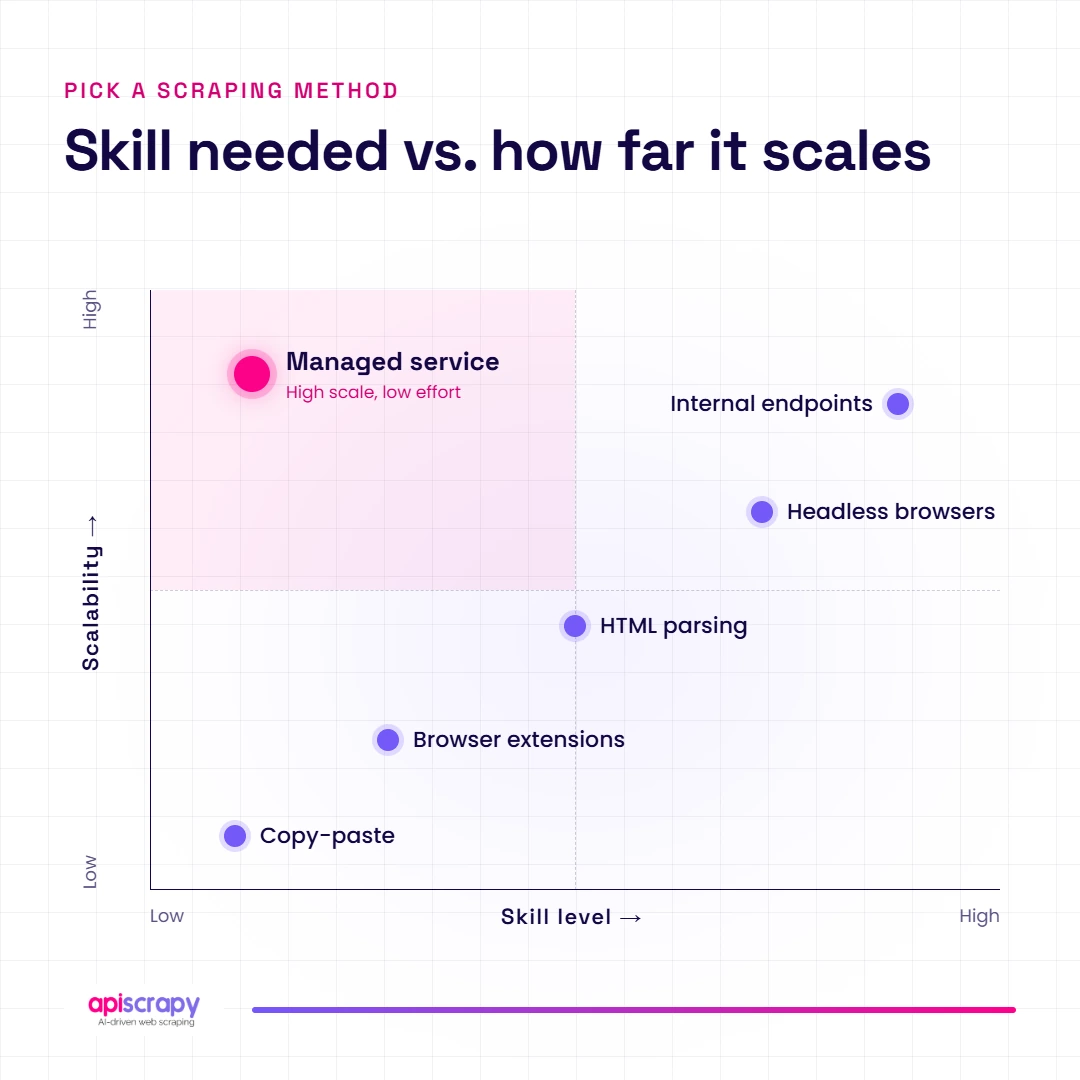
Many websites offer no API, so you need another route. Each method below trades speed, skill, and scale differently.
| Method | Best For | Skill Level | Scalability |
|---|---|---|---|
| Manual copy-paste | One-off, tiny datasets | None | Very low |
| HTML parsing with scripts | Static pages | Intermediate | Medium |
| Headless browser automation | JavaScript-heavy pages | Advanced | Medium to high |
| Browser extensions | Quick, small jobs | Beginner | Low |
| Internal endpoint calls | Sites that load data via JSON | Advanced | High |
- Manual copy-paste: needs no skills, but it is slow and error-prone beyond a few dozen rows.
- HTML parsing: fast and cheap for static pages, but scripts break when the layout changes.
- Headless browsers: render JavaScript like a real visitor, though they use more time and computing power.
- Browser extensions: point-and-click and beginner friendly, but limited on pagination and volume.
- Internal endpoints: open the Network tab and you will often find the JSON feed the page itself uses. It is clean and fast, but it can change without notice.
How to choose: pick by data volume, site complexity, and your team’s skills. Under 100 rows, use an extension. For thousands of rows on a complex site, use code or a managed web scraping service.
Pulling Data from the Web Without Code (Low-Code Options)
No-code and low-code extraction lets marketers, analysts, and operations teams collect web data without a developer. If you can click and copy, you can start.
The main options are:
- Browser extensions: best for small, one-page jobs, but weak on pagination and logins
- Point-and-click scraping services: you select fields visually and schedule runs, though complex sites often need manual fixes
- Spreadsheet import functions: Google Sheets can pull simple tables and lists with IMPORTHTML, but it fails on JavaScript-rendered pages
- Managed data services: a provider builds, runs, and maintains the extraction for you
This is where APISCRAPY fits. As a managed web scraping and data-as-a-service provider, it delivers clean, structured data in formats like CSV, JSON, or Excel, so you never write or repair a scraper yourself.
Honest limits: no-code options struggle with heavily protected sites, very large volumes, and custom logic. When a project outgrows point-and-click, a managed service is usually the practical next step.
Example scenario: a team without developers
A retail operations team needed competitor prices from dozens of stores every week. They had no developer capacity, and manual checks took days and went stale quickly.
With a managed extraction service, they received scheduled, structured price files and stopped maintaining collection themselves. (Replace this scenario with a verified APISCRAPY client result and real metrics before publishing.)
What Are the Use Cases of Web Data Extraction?
Web data extraction supports almost every function that depends on outside information.
- Price and competitor monitoring: ecommerce and pricing teams track rival prices and stock daily to adjust their own.
- Lead generation: sales teams build targeted prospect lists from public directories and business listings.
- Market and trend research: analysts follow product launches, demand shifts, and category trends across many sources.
- Real estate aggregation: portals and investors combine listings, prices, and location details from multiple sites.
- AI and machine learning training data: data teams collect large text and image datasets to train and test models.
- News, review, and sentiment tracking: brands watch mentions and customer feedback to spot problems early.
Is It Legal to Extract Data from a Website Without an API?
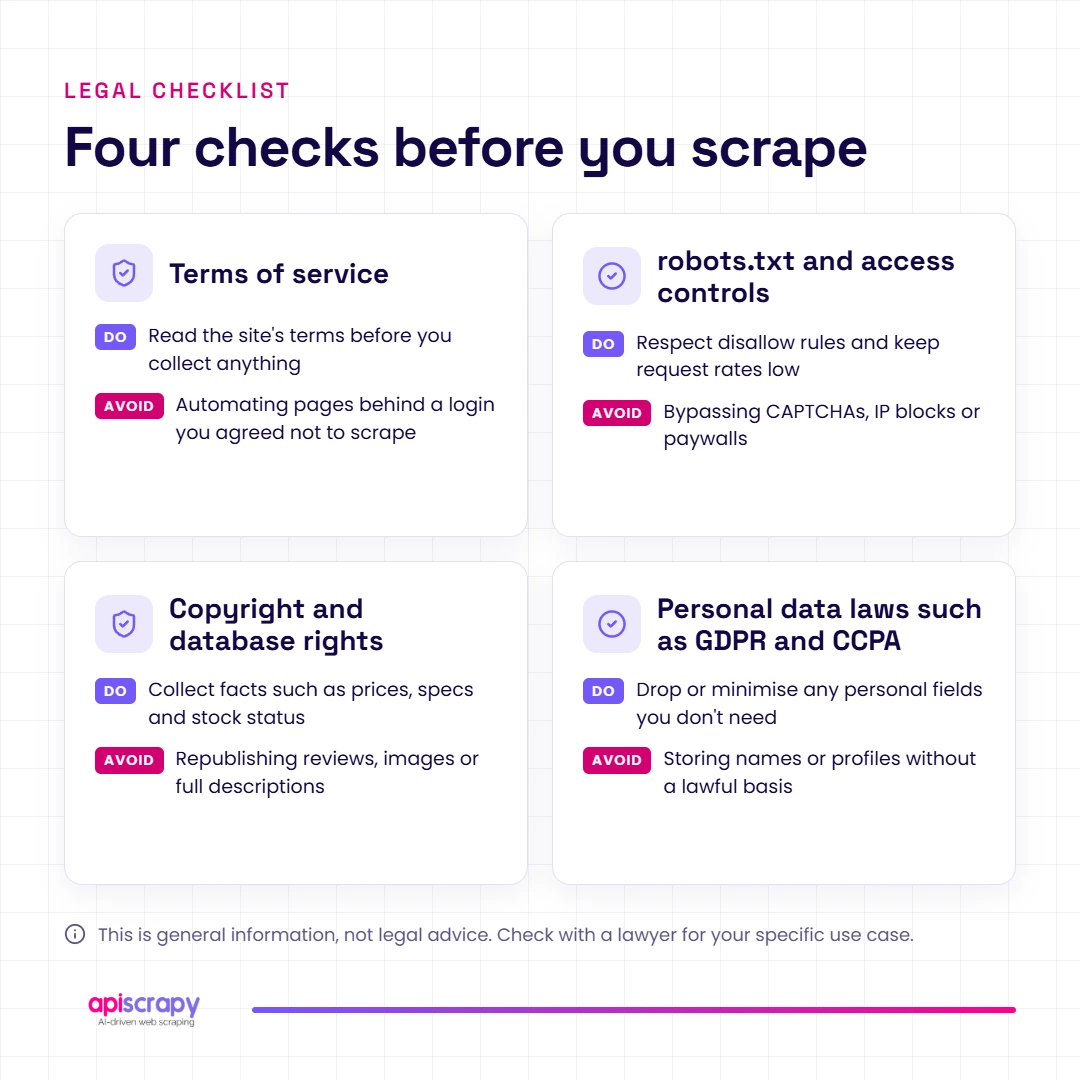
Extracting publicly available data is often lawful, but legality depends on what you collect, how you collect it, and what you do with it.
In the US, the Ninth Circuit held in hiQ v. LinkedIn that accessing public pages likely does not violate the Computer Fraud and Abuse Act. Yet the case did not end there: a later court enforced LinkedIn’s user agreement against scraping under contract law.
The key factors to check are:
- Terms of service: breaching them can create contract liability
- robots.txt and access controls: respect crawl rules and never bypass logins
- Copyright and database rights: facts are freer than creative content
- Personal data laws: GDPR and CCPA apply to names, emails, and other personal details
Responsible practice: throttle your requests, skip private or personal data, and collect only what you need.
This is general information, not legal advice. Consult qualified counsel before starting a large or sensitive project.
Start Building Your Web Crawler Today
Conclusion
Web data extraction turns scattered web content into structured data you can analyze, share, and act on. The right method depends on your scale, technical skill, and how often you need fresh data.
Start small with a script or extension, and move to a managed web scraping service when maintenance starts to cost more than the data is worth.
Ready to get clean, structured web data without building scrapers? Book a demo with APISCRAPY today.
Frequently Asked Questions About Web Data Extraction
How do I extract all text from a website?
Fetch the page with Python Requests and use BeautifulSoup's get_text() method. For JavaScript-rendered pages, use Playwright first, then extract the text.
How can I extract images from a website?
Collect every tag's src attribute, convert relative paths to full URLs, and download each file. Check the site's usage rights before reusing images.
Is web data extraction the same as web scraping?
Not exactly. Web scraping is one method of web data extraction; extraction also covers APIs, feeds, and managed data services.
Is extracting public data illegal?
Usually not, but terms of service, copyright, and privacy laws like GDPR still apply. Avoid personal data and seek legal advice for large projects.
What programming languages are best for web data extraction?
Python is the most popular thanks to Requests, BeautifulSoup, and Scrapy. JavaScript (Node.js with Puppeteer or Playwright) is a strong choice for dynamic sites.