Web Crawler Development: How to Build a Custom Crawler
Off-the-shelf scraping tools work well at small scale, but teams outgrow them fast as data volume and site complexity increase.
‘A custom web crawler does more than fetch web pages. It manages URL discovery, deduplication, crawl scope, request scheduling, rendering, retries, and data storage. The right architecture depends on whether you’re crawling a single website, monitoring a set of domains, or processing millions of URLs across distributed workers.’
This guide walks through the architecture, stack decisions, and build steps needed to create a reliable custom crawler.
- Built and debugged production crawlers handling millions of URLs across hundreds of domains
- Reviewed common failure patterns in frontier management, parsing, and rate limiting
- Tested politeness and compliance controls against real robots.txt implementations
A managed crawling service, including APISCRAPY, is referenced later as an alternative to building and maintaining this yourself.
Whether you build your own crawler or choose a managed service, the goal here is a system that actually works.
- Step 1: Nail the core loop: fetch → parse → dedupe → store This four-step loop is the heart of any crawler, and it’s unforgiving — get one part wrong and everything downstream breaks. A weak dedupe step causes duplicate fetches; no timeout handling lets one slow host silently stall the whole crawler.
- Step 2: Pick your stack based on scale, not preference Python is the right call for fast development and prototyping. Go or Rust only start to matter once throughput and memory efficiency become the actual bottleneck. If pages are JavaScript-rendered, a plain HTTP request won’t cut it — you need a headless browser.
- Step 3: Build in politeness controls from day one Parse robots.txt, add per-host delays, and identify your crawler honestly in the user-agent string. These aren’t optional extras — skipping them leads to fast IP blocks and real legal exposure.
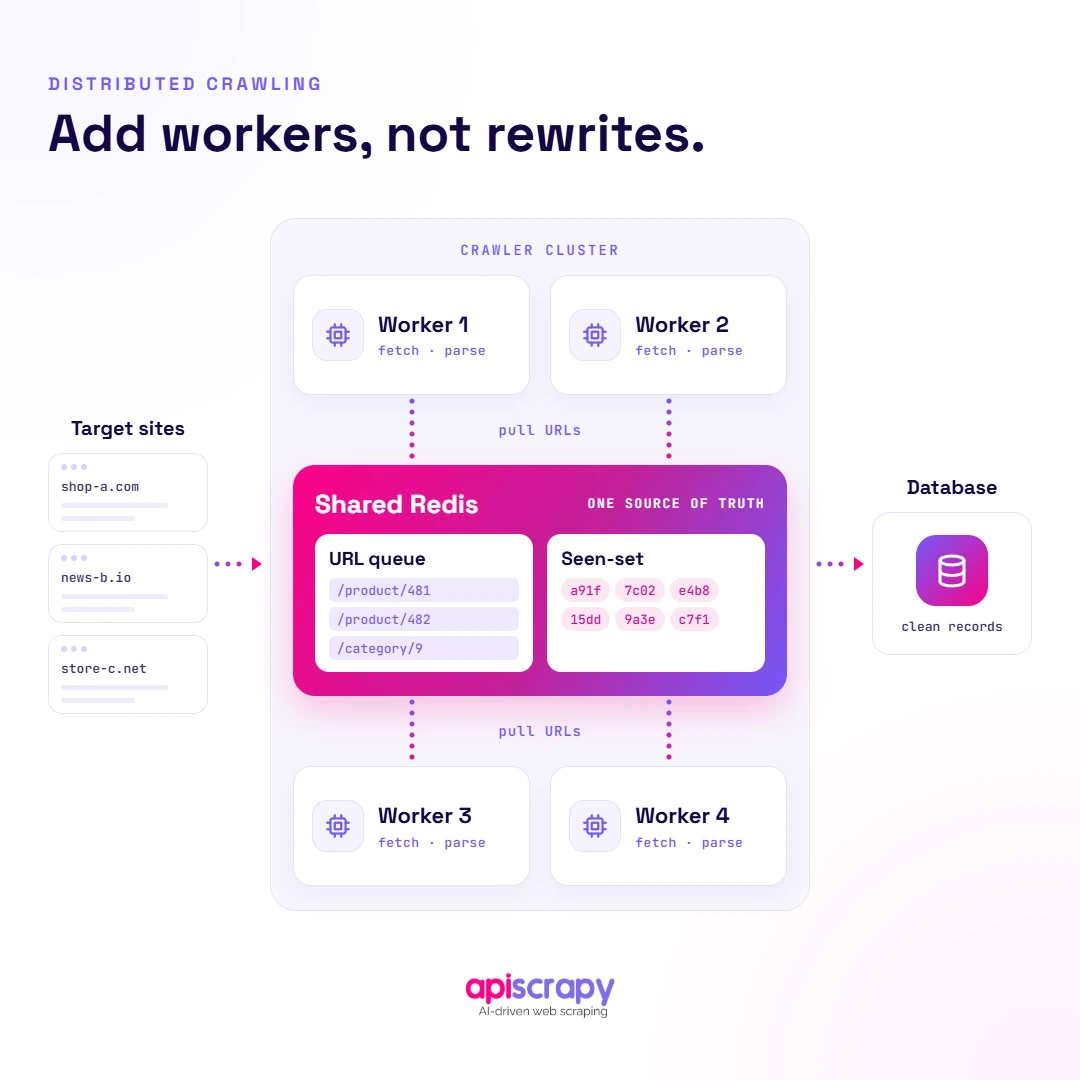
- Step 4: Share the frontier to scale horizontally Once one machine isn’t enough, a shared queue plus a shared seen-set (commonly via Redis) is what lets a team add more workers instead of rewriting the crawler from scratch as volume grows.
- Step 5: Budget for maintenance, not just the build Teams running crawlers at scale consistently find that ongoing upkeep — not the initial build — consumes most engineering time, as target sites redesign, add anti-bot defenses, and shift how they render content.
1. Architectural Blueprint: The Core Loop
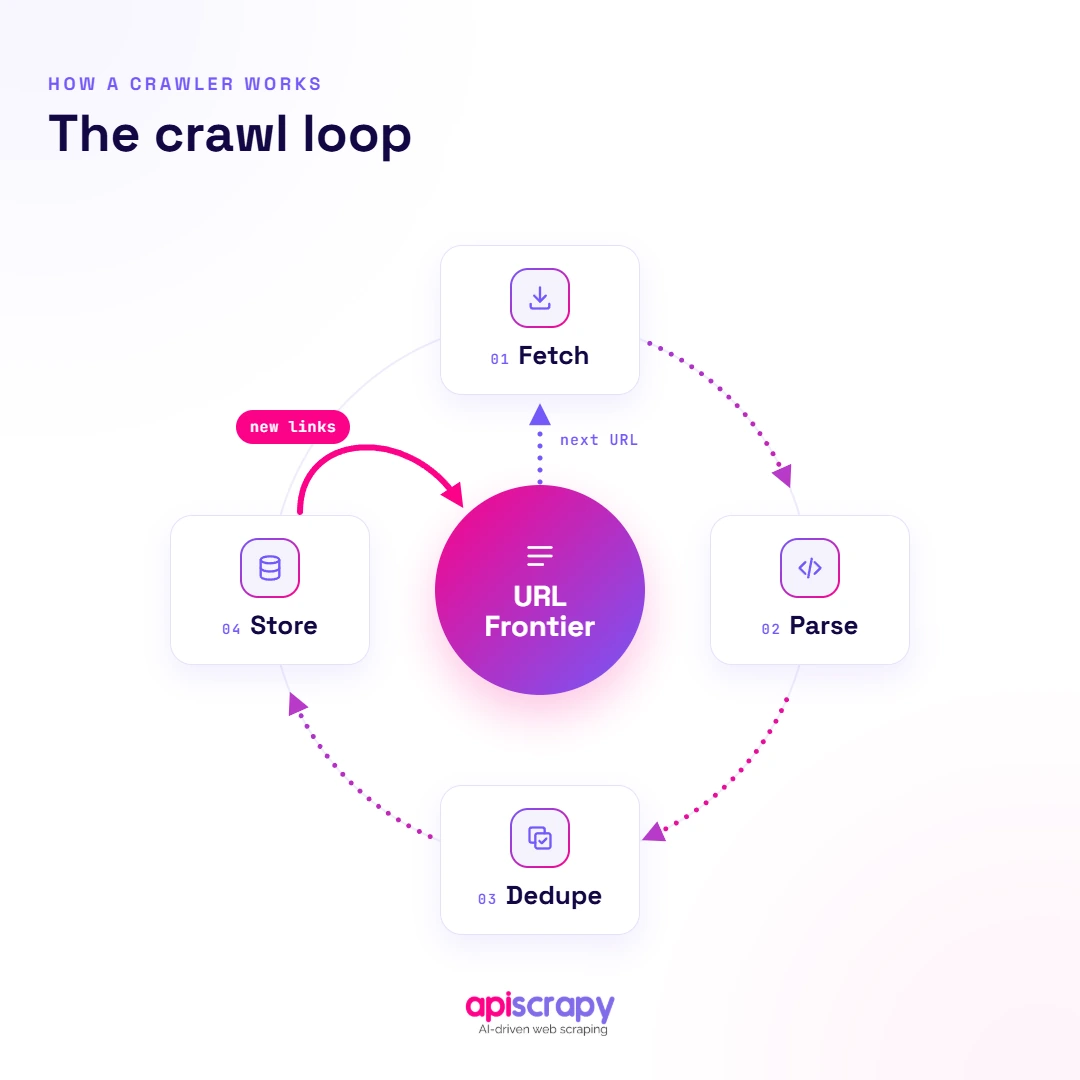
Every crawler runs the same loop: pull a URL from the queue, fetch it, parse the response, extract new links, then store the data and requeue what it found.
Get this loop wrong and everything downstream breaks, from duplicate fetches to a crawler that silently stalls on one slow host.
- Fetch: request the page over HTTP with a defined timeout and retry policy
- Parse: extract content and outbound links from HTML or the rendered DOM
- Dedupe: check extracted URLs against a seen-set before requeuing them
- Store: persist raw content and extracted data separately so either can be reprocessed
A production crawler typically connects these components through a URL frontier:
Seed URLs

↓

URL Frontier

↓

Fetch

↓

Parse

↙ ↘

New URLs Extracted Data

↓ ↓

Dedupe Store

↓

URL Frontier
The URL frontier manages pending work, the fetcher retrieves pages, the parser processes responses and discovers links, and the storage layer preserves the resulting content or extracted data.
2. Choosing Your Technology Stack
The right stack depends on scale and site complexity, not a single universally correct choice.
- Language: Python for fast development, Go or Rust when throughput and memory efficiency matter more
- HTTP client: an async client handles thousands of concurrent requests without blocking each thread
- Parser: lxml or BeautifulSoup for static HTML, a headless browser for JavaScript-rendered pages
- Queue and storage: a message queue such as Redis paired with a database for extracted records
3. Step-by-Step Implementation Guide
Step 1: Initialize the URL Frontier
The URL frontier holds every URL waiting to be crawled, ordered by priority so important or fast-changing pages get fetched first.
In practice, seed a queue with your starting URLs, then push newly discovered links into it as pages get parsed and crawled.
- Deduplication: hash each URL before adding it to the queue to skip repeats
- Prioritization: score URLs by page importance and update frequency, not just discovery order
- Revisit scheduling: recrawl high-change pages like news or pricing more often than static ones
- Crawl scope: define which domains, paths, and URL patterns the crawler is allowed to follow
URL Normalization and Deduplication
Hashing the raw URL is not always enough. Different URL representations can point to the same underlying resource.
For example:
https://example.com/product/123

https://example.com/product/123/

https://example.com/product/123?utm_source=google
Depending on the crawler’s rules, these URLs may represent the same page.
Before checking whether a URL has already been seen, normalize it by resolving relative URLs, normalizing hosts and default ports, removing fragments, and filtering unnecessary tracking parameters where appropriate.
A crawler can also use maximum crawl depth, page limits, or crawl duration to prevent the frontier from expanding indefinitely.
A priority queue keyed on score, with a seen-set for deduplication, is enough to run this correctly on a single machine.
import heapq

import hashlib

class URLFrontier:

def __init__(self):

self._heap = [] # (priority, insertion_order, url)

self._seen = set() # hashed URLs already queued or crawled

self._counter = 0

def _key(self, url: str) -> str:

return hashlib.sha256(url.encode()).hexdigest()

def add(self, url: str, priority: float = 1.0):

url_key = self._key(url)

if url_key in self._seen:

return False

self._seen.add(url_key)

# heapq is a min-heap, so negate priority for highest-first order

heapq.heappush(self._heap, (-priority, self._counter, url))

self._counter += 1

return True

def next(self) -> str | None:

if not self._heap:

return None

_, _, url = heapq.heappop(self._heap)

return url

def __len__(self):

return len(self._heap)
For crawls that need to survive a restart, swap the in-memory set for a Redis set and the heap for a Redis sorted set, keyed the same way.
Step 2: Fetching and Parsing (Python Example)
A production fetch step needs retries with backoff, since transient errors and rate-limit responses are normal at any real crawl volume.
import requests

from requests.adapters import HTTPAdapter

from urllib3.util.retry import Retry

from bs4 import BeautifulSoup

def build_session() -> requests.Session:

session = requests.Session()

retry = Retry(

total=3,

backoff_factor=0.5, # sleeps 0.5s, 1s, 2s between retries

status_forcelist=[429, 500, 502, 503, 504],

allowed_methods=["GET", "HEAD"],

)

adapter = HTTPAdapter(max_retries=retry, pool_maxsize=50)

session.mount("https://", adapter)

session.mount("http://", adapter)

return session

SESSION = build_session()

def fetch_and_parse(url: str):

headers = {

"User-Agent": "MyCrawler/1.0 ([email protected])"

}

response = SESSION.get(url, timeout=10, headers=headers)

if response.status_code != 200:

return [], None

soup = BeautifulSoup(response.text, "html.parser")

links = [a["href"] for a in soup.find_all("a", href=True)]

title = soup.find("title")

return (links, title.text if title else None)
Handle Different HTTP Responses
In a production crawler, HTTP responses should not all be treated as the same type of failure. The response status helps determine whether the crawler should process, retry, redirect, or stop requesting the URL.
- 301 / 302 / 307 / 308: follow and record the redirect
- 403: record access denied or blocked responses
- 404: mark the URL as unavailable
- 429: back off before retrying
- 500 / 502 / 503 / 504: retry when appropriate
This helps the crawler decide whether a URL should be retried, redirected, skipped, or recorded as a permanent failure.
This handles static HTML, but sites that render content with JavaScript return an empty shell to a plain HTTP request and need a browser instead.
import asyncio

from playwright.async_api import async_playwright

async def fetch_rendered(url: str) -> str:

async with async_playwright() as pw:

browser = await pw.chromium.launch(headless=True)

page = await browser.new_page(

user_agent="MyCrawler/1.0 ([email protected])"

)

await page.goto(url, wait_until="networkidle", timeout=15000)

html = await page.content()

await browser.close()

return htmlpip install playwright
playwright install chromiumReserve the headless browser path for pages that genuinely need it, since it costs far more CPU and time per page than a plain HTTP request.
For larger crawls, reuse browser instances or maintain a browser pool rather than launching a new browser process for every URL. A common strategy is to use normal HTTP requests by default and switch to browser rendering only when the required content depends on JavaScript.
Step 3: Implement Politeness & Compliance Controls
Ignoring robots.txt or hammering a server with requests gets crawlers blocked fast, and in some jurisdictions creates real legal exposure around unauthorized access.
- Parse robots.txt before crawling any domain and honor its disallow rules
- Add delays between requests to the same host, typically one to a few seconds
- Identify your crawler honestly in the user-agent string, including contact information
- Respect server rate-limit signals such as HTTP 429 and Retry-After when provided
Python’s standard library ships a robots.txt parser, so there is rarely a reason to skip this check or hand-roll one.
import urllib.robotparser as robotparser

from urllib.parse import urlparse

class RobotsCache:

def __init__(self, user_agent: str):

self.user_agent = user_agent

self._parsers = {} # domain -> RobotFileParser

def allowed(self, url: str) -> bool:

domain = urlparse(url).netloc

if domain not in self._parsers:

rp = robotparser.RobotFileParser()

rp.set_url(f"https://{domain}/robots.txt")

try:

rp.read()

except Exception:

# Explicit fallback policy: pause this domain until

# robots.txt can be retrieved. Adjust to fit your use case.

return True

self._parsers[domain] = rp

return self._parsers[domain].can_fetch(self.user_agent, url)
If robots.txt cannot be retrieved, the crawler should follow an explicit fallback policy rather than silently assuming that crawling is always allowed. Depending on the application, this may mean retrying, pausing that domain, or proceeding under a defined policy.
Pair that with a simple per-host delay so the crawler never sends two requests to the same domain faster than the interval you set.
import time

class RateLimiter:

def __init__(self, delay_seconds: float = 2.0):

self.delay = delay_seconds

self._last_hit = {}   # domain -> last request timestamp

def wait_if_needed(self, domain: str):

now = time.monotonic()

last = self._last_hit.get(domain, 0)

elapsed = now - last

if elapsed < self.delay:

time.sleep(self.delay - elapsed)

self._last_hit[domain] = time.monotonic()
At larger scale, rate limiting should be coordinated per domain across workers rather than independently inside each crawler process. The crawler can also adjust its request rate when a server returns HTTP 429 or a Retry-After header.
How Do You Scale Web Crawling for Enterprise Data Extraction?
A crawler that works fine on a laptop for a few thousand pages behaves very differently across millions of URLs and hundreds of domains.
Costs climb quickly once you add proxy rotation, distributed workers, and storage for raw HTML alongside structured output.
At scale, a single blocked IP or one misbehaving parser can silently drop entire sites from a crawl for days before anyone notices without proper monitoring.
Target sites redesign layouts, add anti-bot defenses, or change their JavaScript rendering, and every change quietly breaks a piece of the pipeline.
Teams running crawlers at scale consistently report that ongoing maintenance, not the initial build, consumes most of their engineering time.
Scaling past one machine means the frontier itself needs to live somewhere shared, so every worker pulls from the same queue instead of duplicating work.
import redis

from urllib.parse import urljoin

r = redis.Redis(host="localhost", port=6379, decode_responses=True)

FRONTIER_KEY = "crawler:frontier"

SEEN_KEY = "crawler:seen"

def enqueue(url: str):

if r.sadd(SEEN_KEY, url): # returns 0 if already a member

r.rpush(FRONTIER_KEY, url)

def dequeue(timeout: int = 5) -> str | None:

result = r.blpop(FRONTIER_KEY, timeout=timeout)

return result[1] if result else None

# any number of worker processes can run this loop against the same Redis instance

def worker_loop():

while True:

url = dequeue()

if url is None:

continue

links, data = fetch_and_parse(url)

for link in links:

enqueue(link) # resolve relative URLs
This pattern, a shared queue plus a shared seen-set, is what lets you add workers horizontally instead of rewriting the crawler as volume grows.
What Should You Monitor?
At scale, track a small set of crawler metrics so failures do not remain hidden:
- URLs queued and processed
- Successful and failed requests
- Retry rate
- HTTP 403 and 429 rates
- Average response time
- Queue depth
- Per-domain success rate
These metrics help identify blocked domains, slow responses, stalled workers, and changes in crawl performance.
Types of Web Crawlers Explained
Crawlers fall into a few broad categories, each suited to a different scope of work and refresh requirement.
- General-purpose crawlers: index broad sections of the web, the model used by search engines
- Focused crawlers: target a specific topic or domain and ignore unrelated pages entirely
- Incremental crawlers: revisit known URLs to detect and capture only what changed
- Distributed crawlers: split work across multiple machines to handle enterprise-scale volume
Crawling vs Scraping: Understanding the Difference
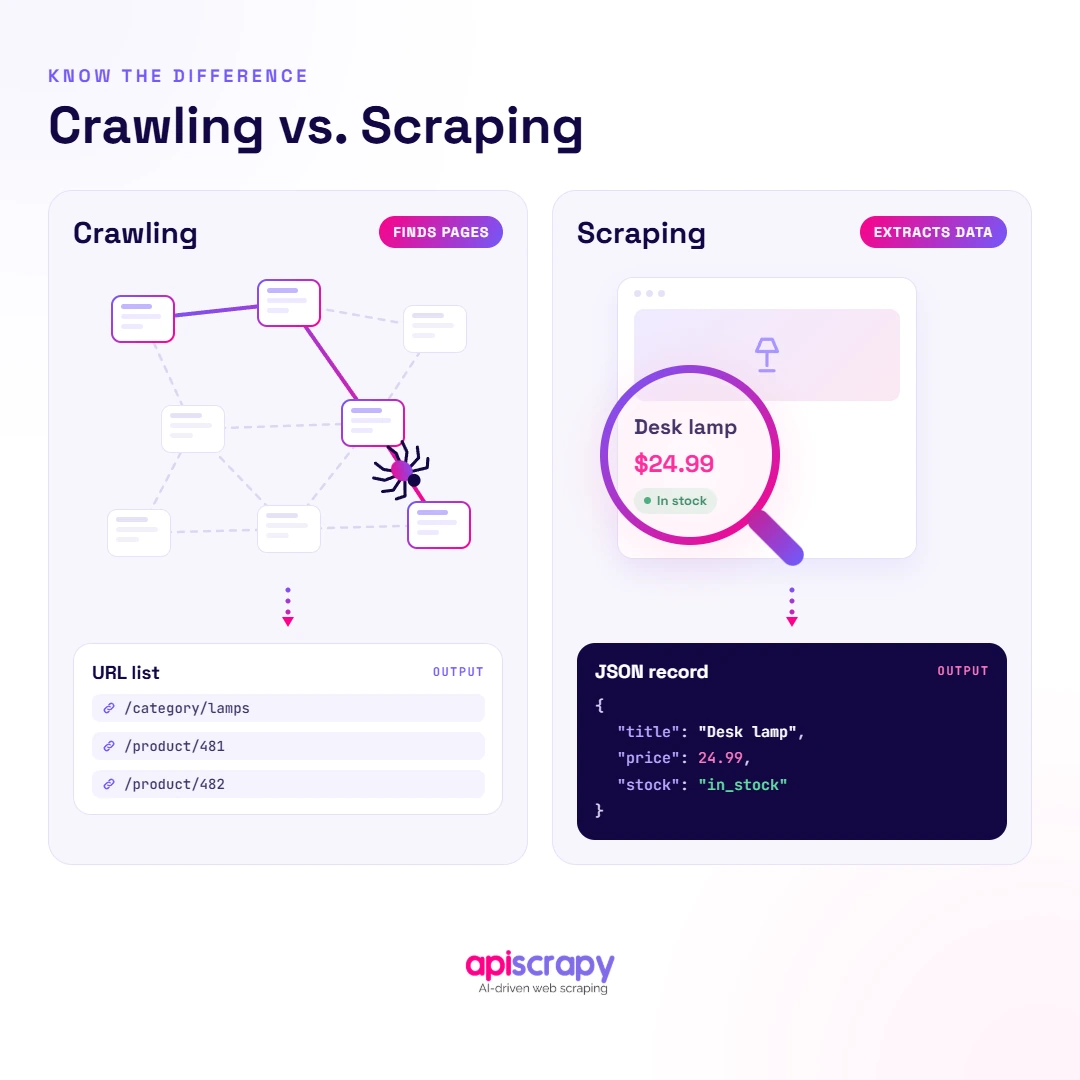
Crawling is the process of discovering URLs by following links across a site, building a map of what pages exist.
Scraping is the process of extracting specific data from a page once it has been found, such as prices or product details.
| Aspect | Crawling | Scraping |
|---|---|---|
| Purpose | Discover URLs across a site or the web | Extract specific data from a known page |
| Output | A list or map of URLs | Structured data records |
| Typical use | Search indexing, site mapping | Price monitoring, lead generation |
For example, a crawler may discover thousands of product pages across an e-commerce website, while a scraper extracts product names, prices, availability, and other fields from those pages.
Want a Crawler That Runs Without Constant Fixes?
For teams that need reliable data but don’t want to dedicate engineering resources to ongoing crawler infrastructure and maintenance, a managed crawling service can be an alternative to building and operating the entire system in-house.
APISCRAPY handles proxy rotation, anti-bot defenses, and JavaScript rendering as a managed service, so extracted data keeps arriving even as target sites change.
Where a self-built crawler needs constant maintenance, a managed service can absorb site changes and blocking issues without interrupting the data feed.
This fits businesses that need dependable data at scale, not teams looking to own crawler infrastructure as a core competency.
Start Building Your Web Crawler Today
Conclusion
Building a custom crawler means owning the frontier, fetch and parse logic, politeness rules, and scaling challenges as data needs grow.
A reliable production crawler also requires URL normalization, crawl scope, deduplication, appropriate rendering, retries, distributed workers, storage, and monitoring.
Start small, get the core loop right, then decide whether ongoing maintenance is worth handling in-house or better handed to a managed service
Frequently Asked Questions
How Do You Build a Custom Web Crawler From Scratch?
Start with a URL frontier, a fetcher, and a parser, then add deduplication and politeness controls before scaling up. Once the core loop works reliably on a small set of URLs, add distributed workers, proxy rotation, and monitoring to handle larger crawls.
What Are the Key Components of a Web Crawler?
A crawler needs a URL frontier, a fetcher, a parser, a deduplication layer, and storage for both raw and extracted data. Politeness controls and monitoring are also essential components, since they determine whether the crawler stays operational without getting blocked or missing failures.
How Does a Web Crawler Discover and Follow URLs?
A crawler starts with seed URLs, fetches each page, then extracts outbound links found in the HTML or rendered DOM. New links get deduplicated, prioritized, and added to the URL frontier, where the process repeats until the queue empties or a limit is reached.
How Can You Crawl JavaScript-Rendered Websites?
Pages that render content with JavaScript need a headless browser like Playwright or Puppeteer instead of a simple HTTP request. The headless browser loads and executes the page's scripts first, then hands the fully rendered HTML to your parser for extraction.
For larger crawls, a practical approach is to use normal HTTP requests by default and switch to browser rendering only when the required content depends on JavaScript.
How Do You Build a Scalable and Efficient Web Crawler?
Scalable crawling requires distributed workers, a shared queue, proxy rotation, and monitoring that flags blocked or stalled crawls quickly. Efficiency also depends on prioritizing high-value pages, respecting crawl-delay rules, and separating storage of raw content from structured extracted data.
Monitoring queue depth, failure rates, response times, and per-domain success rates also helps identify bottlenecks and crawl failures as the system scales.