A Complete Guide to Scraping eCommerce Websites
Product prices change by the hour. Stock levels shift overnight. New listings go live faster than any manual process can track, and businesses that fall behind lose pricing and inventory visibility to competitors who don’t.
eCommerce web scraping solves this by automating the collection of product data at scale. This guide covers how it works in practice: the scraper types available, the build process, and the tradeoffs between running your own crawler and using a managed service like APISCRAPY.
In this guide, you will learn:
- What eCommerce web scraping is and why businesses rely on it
- The main types of scrapers and when each one fits
- A step-by-step process for building a working scraper
- Best practices for scaling a crawler without getting blocked
- How to evaluate a scraping service if you decide not to build one
Everything here reflects how eCommerce data extraction works in production, not just in theory. The goal is a clear build-or-buy decision, whichever direction fits your team.
- Quick Answer: How to Scrape an eCommerce Website
- Define your data requirements first — decide exactly which fields you need (price, availability, variants, images, reviews) before writing any code.
- Choose a scraping approach based on how the target site loads data: static HTML parsing, a headless browser for JS-rendered content, or direct API extraction where available.
- Build in anti-bot handling — rotate IP addresses, mimic real browser behavior, and control request timing to avoid detection.
- Parse raw HTML into a consistent schema and store it in a database or warehouse your other tools can query.
- Set up monitoring so a sudden drop in extracted fields flags a broken scraper immediately, not weeks later.
- At scale, add proxy rotation, controlled concurrency, retry logic with backoff, and deduplication across runs.
- If maintaining scrapers across many sites becomes unsustainable, evaluate a managed service against scale, accuracy, compliance handling, and pricing model.
What Is eCommerce Web Scraping?
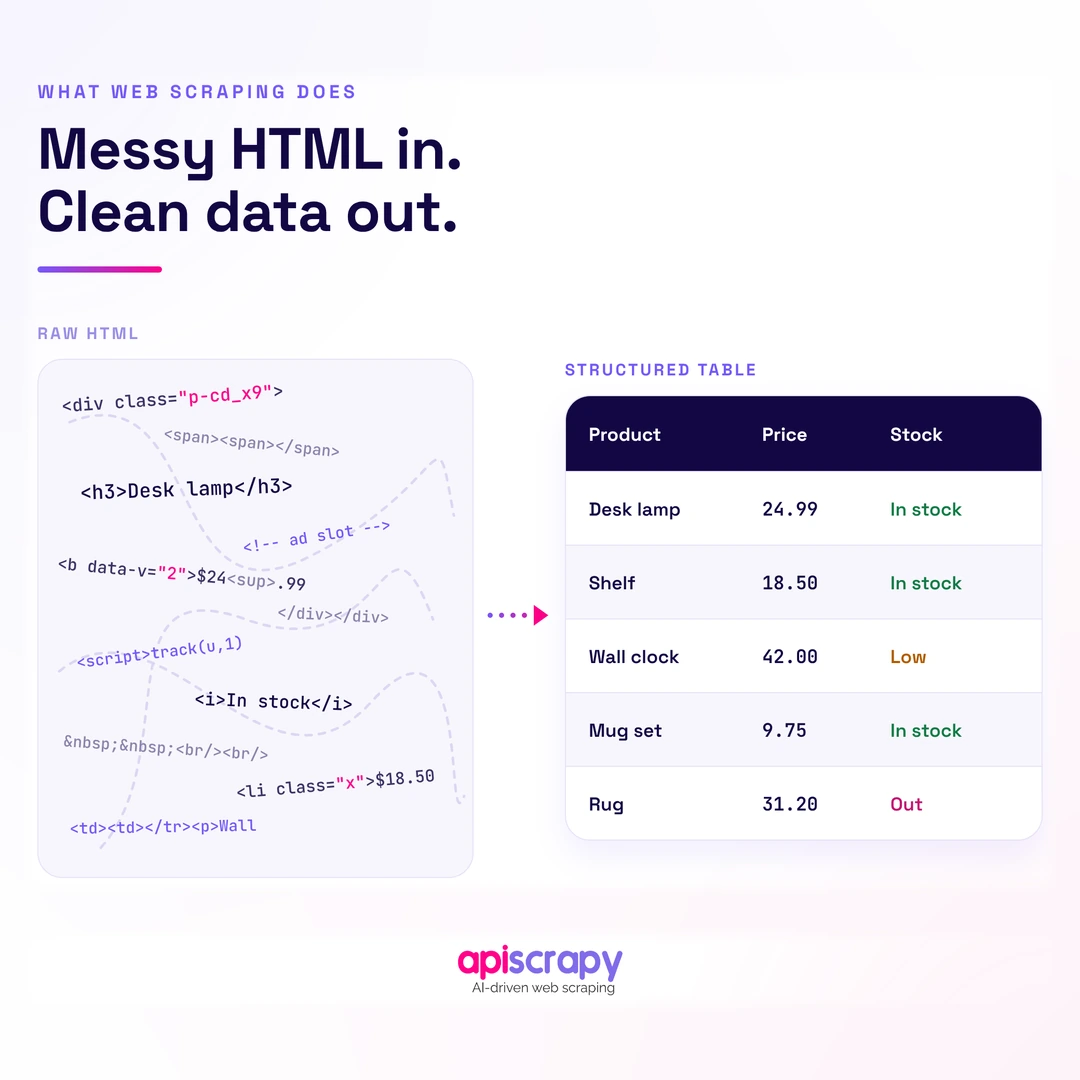
eCommerce web scraping is the automated process of extracting product data such as prices, stock levels, descriptions, and reviews from online stores and marketplaces, then converting that raw data into a structured, usable format.
Instead of a person manually checking competitor prices or copying product details into a spreadsheet, a scraper visits each page, reads the relevant data points, and saves them automatically. This can run once, or on a recurring schedule across thousands of pages.
Retailers, brand manufacturers, market researchers, and price intelligence teams are the most common users. Each group pulls the data for a slightly different reason, but the underlying process is the same.
In practice, eCommerce web scraping shows up in workflows like daily competitor price checks, product catalog enrichment for a marketplace listing, MAP (minimum advertised price) compliance monitoring, and demand forecasting based on stock availability signals.
Why Businesses Scrape eCommerce Data
- Pricing strategy: tracking competitor prices in near real time to adjust your own pricing before you lose a sale
- MAP compliance: catching resellers who list below the manufacturer’s advertised price across marketplaces
- Assortment gaps: identifying products competitors stock that you don’t, or vice versa
- Demand signals: using stock-out frequency and review velocity as early indicators of what’s selling
Types of eCommerce Scrapers
Not every scraper works the same way. The right approach depends on how the target site is built and how often the data needs to update.
By Method
- Static HTML parsing: reads the raw HTML of a page directly, works well on simple product pages that don’t rely on JavaScript to load content
- Headless browser or JS rendering: loads a page the way a real browser would, needed when prices or stock load dynamically after the page opens
- API-based extraction: pulls data directly from a site’s own backend API when one is accessible, generally the fastest and most stable option available
By Deployment
- Self-built or open-source scrapers: full control over logic and output, but the team owns every fix when a site changes
- Managed scraping services: handle infrastructure, blocking, and maintenance, trading some control for reliability and speed to launch
The important distinction is that these approaches can also be combined. For example, a production crawler may use direct HTTP requests for simple pages, API extraction where an appropriate endpoint is available, and browser rendering only for pages that genuinely require JavaScript execution.
How to Scrape a eCommerce website
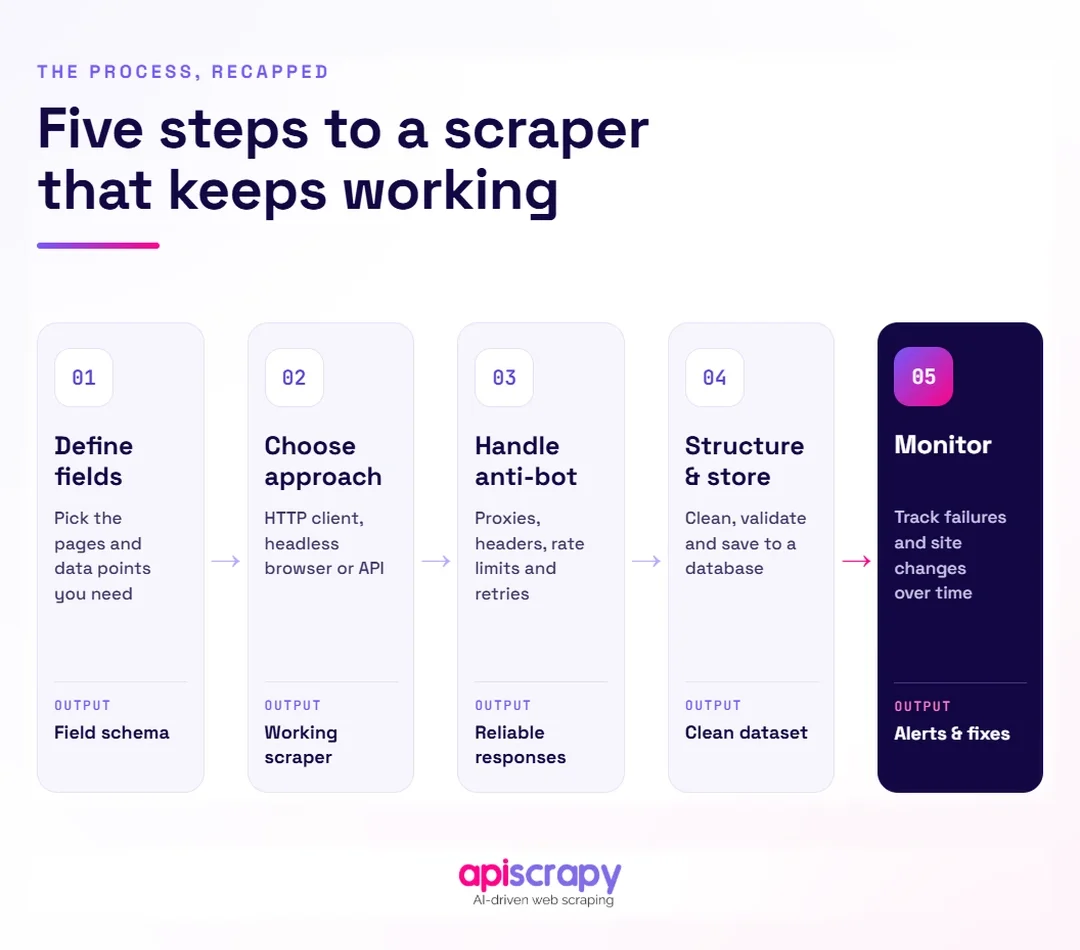
Building your own scraper is a realistic option for teams with development resources and a clear, well-defined data need. Here is the general process.
Step 1: Define Data Requirements
Decide exactly which fields matter before writing any code: price, availability, variant options, images, or reviews. A narrow, well-defined scope keeps the build manageable.
It is also useful to define the expected format for each field before development starts.
For example:
- price → numeric value + currency
- availability → in_stock / out_of_stock
- title → string
- rating → numeric value
- reviews → integer
- images → list of URLs
This makes it easier to maintain a consistent schema when the same product information appears differently across different eCommerce sites.
Step 2: Choose Your Scraping Approach
Check whether the target pages load data statically or dynamically, and whether a usable API exists. This decision, from the types covered above, shapes every technical choice that follows.
A practical decision process is:
- Check the initial HTML for the required data.
- Check the Network tab for API requests.
- Use a direct API or HTTP request when an appropriate endpoint is available.
- Use browser rendering when JavaScript is genuinely required.
- Choose the appropriate extraction method for each target rather than forcing every site through the same approach.
This can have a major impact on both infrastructure cost and scraper reliability.
Step 3: Handle Anti-Bot and JS Rendering
Most eCommerce sites run bot detection that blocks obvious scraping patterns, so the scraper needs realistic browser behavior, rotating IP addresses, and controlled request timing. This is typically the hardest and most maintenance-heavy part of the build.
Depending on the target site, this may also require:
- JavaScript rendering
- Browser automation
- Session and cookie management
- Proxy rotation
- Retry and backoff handling
- Request throttling
- Handling redirects and unexpected responses
- Monitoring for changes in the target site’s behavior
The goal should not be to treat one anti-bot technique as a permanent solution. Detection systems and site behavior change, so the scraper needs monitoring and maintenance as part of the design.
Step 4: Structure and Store Extracted Data
Raw HTML needs to be parsed into a consistent schema, such as a clean product record with standardized field names, before it’s useful. Store it in a database or warehouse that downstream tools can query directly.
For example, a normalized product record might look like:
{

"product_id": "12345",

"title": "Example Product",

"price": 49.99,

"currency": "USD",

"availability": "in_stock",

"rating": 4.5,

"review_count": 128,

"url": "https://example.com/product/12345"

}
A consistent schema becomes particularly important when data is collected from multiple retailers, because each site may use different names, formats, and representations for the same information.
Step 5: Monitor and Maintain the Scraper
eCommerce sites change layout without notice, which silently breaks scrapers built around the old structure. Build in monitoring that flags a sudden drop in extracted fields so breakages get caught fast, not weeks later.
Useful metrics to monitor include:
- Number of pages processed
- Successful and failed extractions
- Empty-field rate
- HTTP error rate
- 403 and 429 responses
- Retry rate
- Average response time
- Extraction latency
- Products extracted per run
- Per-domain success rate
Monitoring should ideally distinguish between a temporary network failure and a genuine extraction failure. For example, a sudden increase in successful page loads but missing product prices can indicate that the website layout changed even though HTTP requests are still returning 200 OK.
What Are the Best Practices for Scaling a Web Crawler?
A scraper that works reliably for one site or a few hundred pages often breaks down once it needs to run across thousands of pages and multiple domains. Scaling introduces a different set of problems than building the first version.
Infrastructure and Performance
- Rotate proxies across requests so traffic doesn’t concentrate on a single IP address and trigger a block
- Run requests concurrently in controlled batches rather than one page at a time, to keep throughput reasonable
- Throttle request rate per domain so the crawl doesn’t look like a traffic spike to the target site
- Reuse browser instances and contexts where appropriate rather than launching a completely new browser process for every page
- Separate browser-based workloads from lightweight HTTP workloads so expensive browser sessions are used only where necessary
Controlled concurrency is important here. Increasing the number of workers indefinitely does not necessarily improve throughput because the target website, proxy capacity, network bandwidth, browser resources, or your own infrastructure can become the bottleneck.
Reliability and Compliance
- Build retry logic with backoff for failed requests instead of treating every failure as permanent
- Check robots.txt and relevant regional data laws before crawling, and keep a documented compliance policy
- Handle rate-limit responses such as HTTP 429 appropriately rather than immediately retrying at the same request rate
- Record failures and retry history so persistent problems can be distinguished from temporary failures
A retry system should also have limits. Repeatedly retrying a blocked or consistently failing URL can increase traffic without improving the result.
Data Quality at Scale
- Deduplicate records across runs so the same product listing doesn’t get counted multiple times
- Enforce a consistent schema across sources, since every site formats prices, sizes, and titles differently
- Validate important fields such as price, currency, availability, and product identifiers before storing the final record
- Track extraction completeness so missing fields can be detected rather than silently accepted
At scale, data quality becomes just as important as crawl speed. Processing millions of pages is not useful if a significant portion of the resulting product records contain incorrect or missing fields.
Choosing the Right Scraping Service
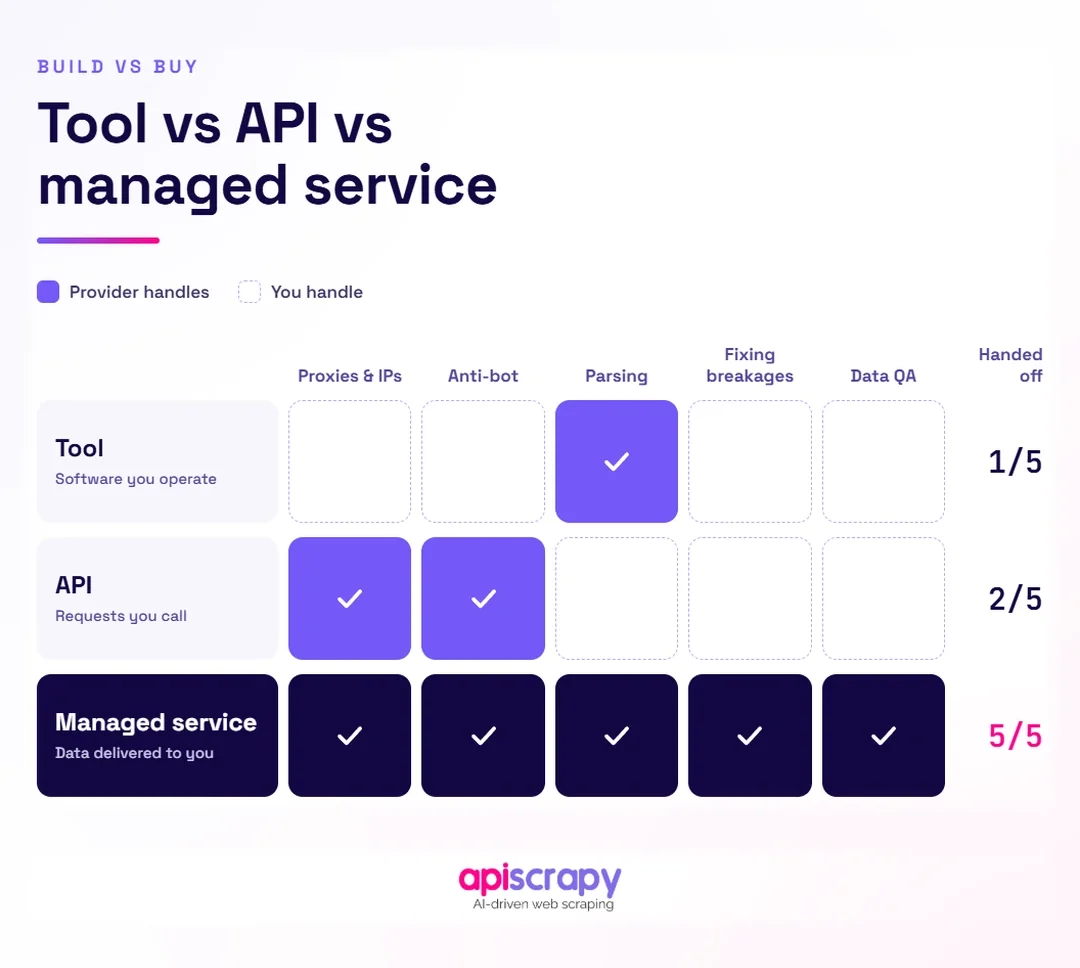
At some point, most growing teams face a build-versus-buy decision. Maintaining scrapers across dozens of retail sites is a full-time job in itself, and that’s usually when a managed data service starts to make sense.
The right evaluation depends on your actual workload rather than simply comparing feature lists.
Key Evaluation Criteria
- Scale and reliability: can the service maintain accurate extraction across thousands of pages without frequent downtime
- Data accuracy: does the service validate extracted fields, or does it hand over raw, unchecked output
- Compliance handling: does the provider account for robots.txt, rate limits, and regional data regulations by default
- Support and turnaround: how quickly does the service adapt when a target site changes its layout
- Pricing model: is cost tied to pages scraped, data volume, or a flat subscription, and does it match your actual usage pattern
Managed services like APISCRAPY shift the maintenance burden away from internal engineering teams, which matters most once scraping needs span many sites rather than one or two.
Before choosing a service, it is also useful to test it against a representative sample of your actual target websites. A solution that works well for one retailer may behave differently on another because sites can vary significantly in their rendering, pagination, product structures, and access controls.
Start Building Your Web Crawler Today
Conclusion
eCommerce web scraping comes down to three decisions: what data you actually need, how you’ll extract it, and how you’ll keep that extraction running as sites and scale change. Each choice compounds on the one before it.
There’s no single right answer between building in-house and using a managed service. It depends on your team’s technical bandwidth, how many sources you need to cover, and how critical uptime is to your pricing or catalog decisions.
If your team is weighing that decision, start by mapping out exactly which fields you need and from how many sites, then evaluate build effort against a managed service against that specific scope.
FAQs
What E-Commerce Data Should You Scrape to Track Competitors and Prices?
Track competitor prices, stock status, product variants, shipping costs, and review counts, since these fields drive most pricing and assortment decisions.
Depending on the use case, you may also want to capture:
Product title
Product URL
Product identifier
Brand
Currency
Discount or sale price
Images
Ratings
Review count
Availability
Variant information
The exact fields should depend on what decisions you need the data to support.
How Do You Scrape Product Prices and Inventory at Scale?
Use rotating proxies, concurrent requests, and a consistent data schema across sources to pull prices and inventory reliably across thousands of listings.
At larger scale, also add:
Controlled concurrency
Per-domain rate limits
Retry logic with exponential backoff
Deduplication
Monitoring
Data validation
Persistent job and extraction tracking
This allows the system to distinguish between temporary request failures and actual extraction problems.
Can You Scrape Dynamic E-Commerce Websites Without Getting Blocked?
Dynamic eCommerce websites often require additional handling because their content may depend on JavaScript rendering and their infrastructure may also use automated traffic detection.
Use headless browser rendering when required, combined with realistic request timing, appropriate IP management, and controlled concurrency.
It is also important to monitor HTTP responses and extraction quality. A scraper that continues sending requests after receiving repeated blocking responses can make the situation worse rather than improving reliability.
How Do You Choose the Best E-Commerce Scraping Solution for Your Business?
Match the solution to your scale and technical resources: build in-house for narrow, stable needs, or evaluate a managed service once coverage spans many sites.
Consider:
Number of websites
Number of pages or products
Required update frequency
Percentage of sites requiring JavaScript rendering
Proxy and infrastructure requirements
Data quality requirements
Monitoring and maintenance requirements
Compliance requirements
Internal engineering capacity
Total operating cost
For a small number of stable websites, maintaining your own scraper may be manageable. As the number of sources, extraction frequency, and maintenance requirements increase, a managed service becomes another option to evaluate against the same requirements.