A Web Scraper’s Guide to robots.txt: How to Crawl Websites Responsibly
Web scraping is only as sustainable as the trust it keeps with the sites it draws from. robots.txt is the first signal a scraper gets about that trust. This guide covers what it is, how to read it, and where the real legal and technical risk actually sits.
- robots.txt is an important crawler signal, not a technical access-control mechanism. It is part of the Robots Exclusion Protocol and communicates how a site asks automated crawlers to behave. A scraper can technically ignore it, but doing so does not eliminate the site’s other access, contractual, or legal requirements.
- Ignoring robots.txt can trigger technical consequences before legal ones. IP bans, aggressive rate-limiting, CAPTCHA challenges, and other access restrictions can make a scraper unreliable.
- A missing file doesn’t mean unrestricted access. Many smaller sites never publish one, so the safer move is checking the Terms of Service and scraping conservatively rather than assuming a green light.
- Compliance belongs in the workflow, not a one-time check. Fetching and caching rules per domain, logging skipped pages, and flagging disallowed but critical pages for legal review creates a more defensible scraping process.
- Disallowed does not automatically mean illegal, but it does mean you should investigate further. Other considerations can include Terms of Service, copyright, privacy requirements, authentication boundaries, and unauthorized-access laws.
What Is robots.txt?
robots.txt is a plain text file placed at a website’s root directory that tells web crawlers and scrapers which pages or sections they may or may not access.
The file lives at a predictable address, something like:
https://example.com/robots.txt
and any crawler can request it before starting a crawl.
Search engines use it to decide what to crawl. Scrapers can use it to decide what to collect. Other automated crawlers may also check it before accessing site content.
Key Components of a robots.txt File
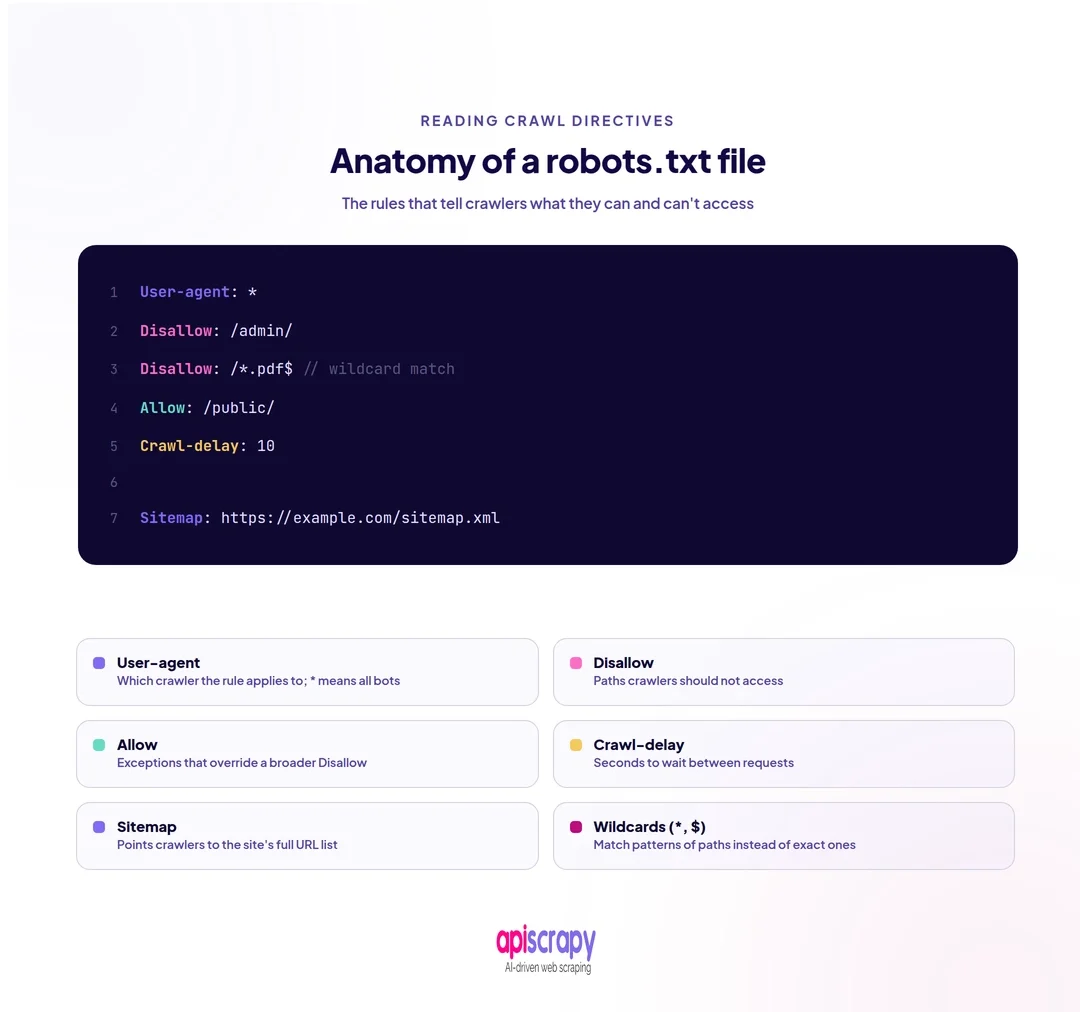
- User-agent: identifies which crawler or bot the following rules apply to, using a name like Googlebot or a wildcard for all bots.
- Disallow: lists the folders or pages a specified user agent should not access during a crawl.
- Allow: creates an exception inside a disallowed folder, permitting access to one specific file or subpath.
- Crawl-delay: asks a bot to wait a set number of seconds between requests to reduce server load.
- Sitemap: points crawlers to the site’s XML sitemap so they can find pages efficiently.
- Wildcards: the * and $ symbols match patterns across many URLs instead of listing each one individually.
For example:
User-agent: *

Disallow: /private/*

Disallow: /checkout/*

Allow: /private/public-info/*

Sitemap: https://example.com/sitemap.xml
This tells a crawler that the rules apply to all user agents, that /private/ and /checkout/ should not be crawled, and that the specified exception is allowed.
Why Is robots.txt Important for Web Scraping?
robots.txt matters because it is the clearest signal a site owner gives about acceptable automated access. Following it keeps a scraping operation defensible if questioned later. Ignoring it turns a routine data project into an avoidable dispute.
Every crawl request consumes server resources. Respecting crawl-delay and disallowed paths reduces load on smaller sites that cannot absorb high-frequency requests.
There is also a trust dimension. Site owners who see well-behaved crawlers in their logs tend to tolerate ongoing access, while aggressive scrapers often get blocked entirely, sometimes across a whole IP range.
For teams running both scraping and SEO, ignoring robots.txt can quietly damage crawl budget and indexing behavior on owned properties.
The important distinction is that robots.txt is a crawler instruction, not a technical security barrier. It does not prevent a technically capable client from requesting a disallowed URL.
How to Read a robots.txt File Before Scraping
Locate the File
Add /robots.txt to the root domain, not a subpage, to find the file.
For example:
https://example.com/robots.txt
Most sites that publish a robots.txt file host it at this predictable path, making it one of the fastest checks in any scraping workflow.
Understand User-agent Rules
Identify which user-agent block applies to your scraper.
A wildcard block applies broadly:
User-agent: *
while a named block can apply only to a particular crawler:
User-agent: Googlebot
Your scraper should determine which rule set applies to the user agent it uses.
Check Disallow and Allow Paths
Read each Disallow line carefully, since paths can be case-sensitive and may use wildcards.
For example:
User-agent: *

Disallow: /account/*

Disallow: /admin/*

This indicates that the crawler should not request those paths.

An Allow rule can create an exception within a broader disallowed path:

Disallow: /products/*

Allow: /products/public/*
The exact interpretation of overlapping rules can depend on the crawler implementation, so production systems should use a standards-aware robots parser rather than implementing the matching logic themselves.
Look for Crawl-delay and Sitemap Directives
Note any Crawl-delay value and account for it in your request timing where supported.
Sitemap links can also save time by pointing directly to URLs that the site wants crawlers to discover.
For example:
User-agent: *
Crawl-delay: 5
Sitemap: https://example.com/sitemap.xml
Cross-Check Against the Site’s Terms of Service
robots.txt only covers crawler access, not usage rights. Always check the Terms of Service separately, since some sites permit crawling but restrict how the data can be used.
Always check the Terms of Service separately, since some sites may permit crawling while restricting how the resulting data can be copied, redistributed, or commercially used.
How to Use robots.txt in Your Web Scraping Workflow
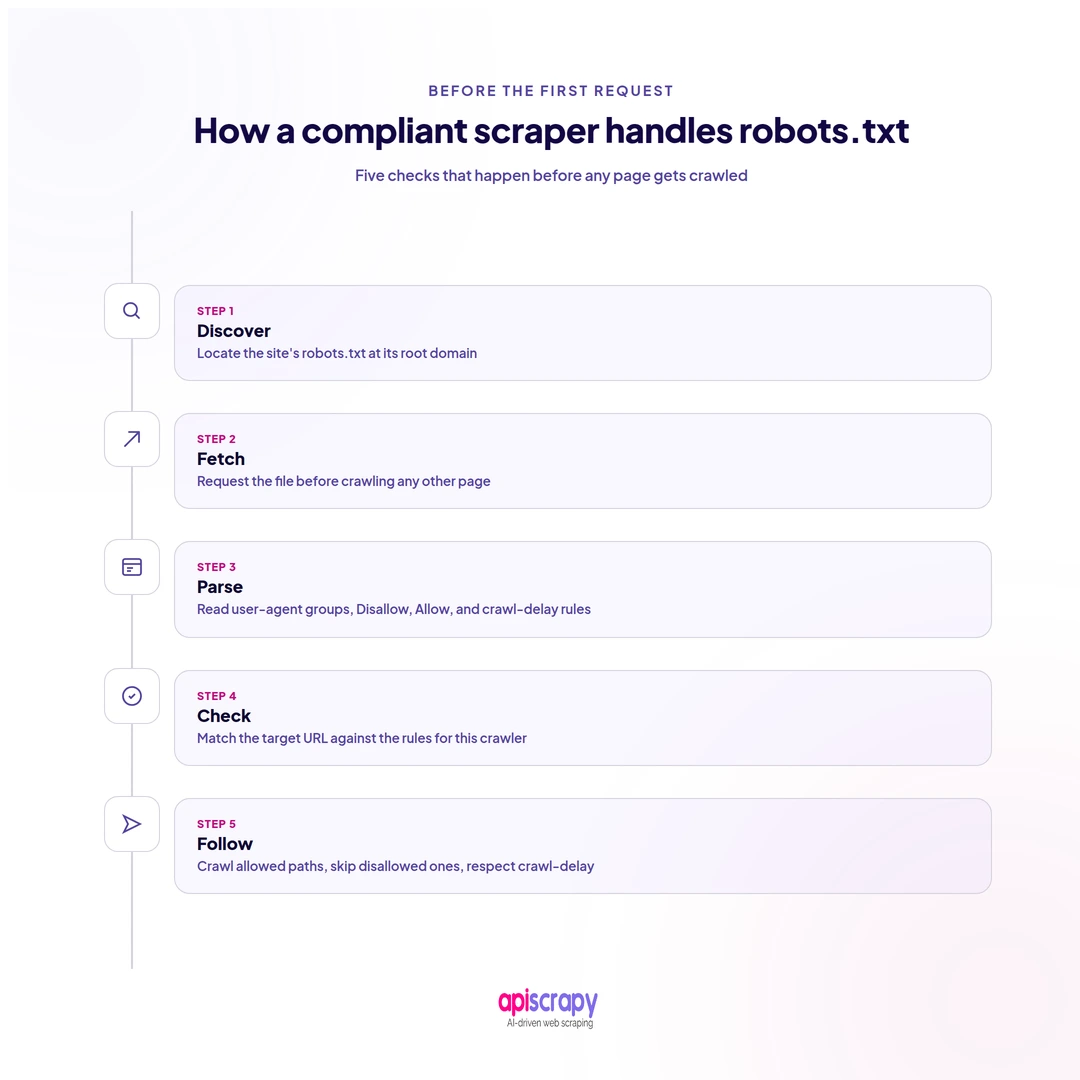
Reading robots.txt once is not enough. It needs to become a built-in step in every crawl, not an afterthought.
A production workflow can follow this pattern:
New Domain
↓
Fetch robots.txt
↓
Parse Rules
↓
Identify Applicable User-Agent
↓
Check Requested URL
↓
Allowed? ───── No ───→ Skip / Log / Review
│
Yes
↓
Apply Crawl Delay / Rate Limit
↓
Request Page
↓
Extract Data
Recommended Workflow Practices
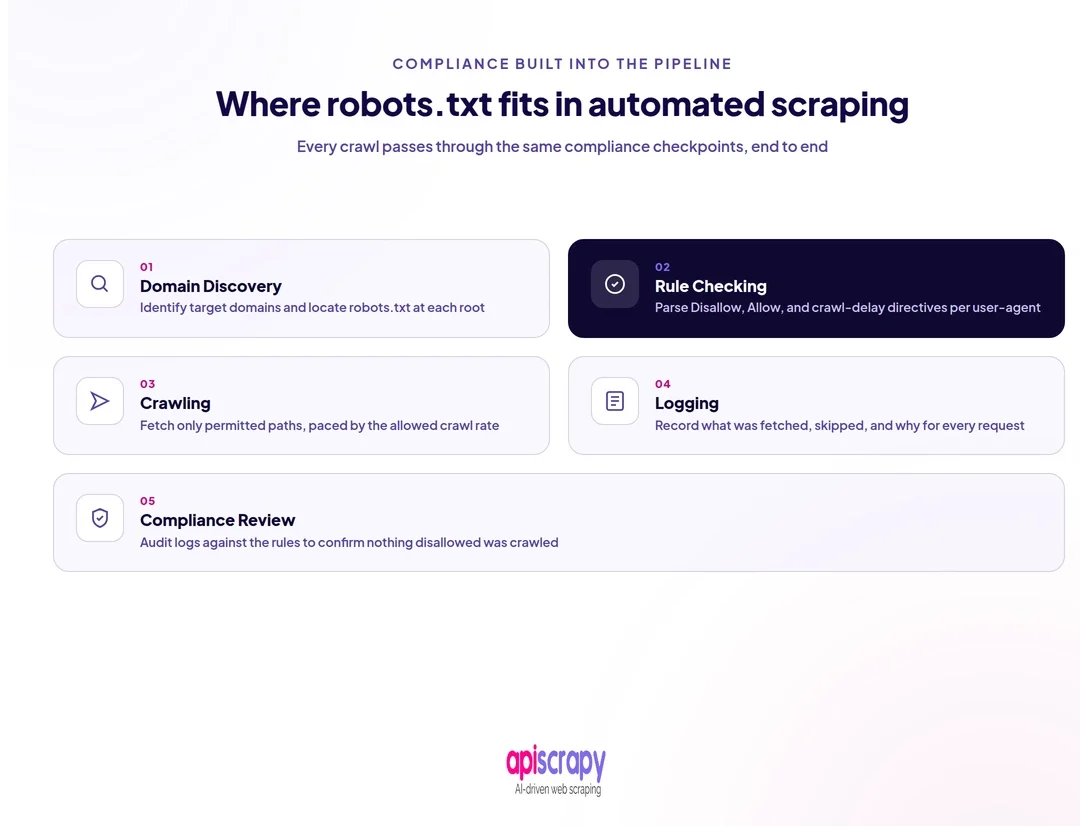
- Fetch and parse robots.txt automatically before a new domain is added to a crawl queue.
- Cache the rules per domain and refresh them periodically, since site owners can update robots.txt without notice.
- Build a fallback rule for missing files rather than assuming unrestricted access by default.
- Log every compliance decision your scraper makes, including skipped pages, for audit purposes later.
- Flag disallowed but business-critical pages for manual legal review instead of silently bypassing the rule.
- Associate the rules with the domain so workers processing the same site use a consistent compliance policy.
Treating robots.txt as an automated workflow step, not a one-time manual check, is what makes responsible scraping easier to maintain at scale.
What If robots.txt Changes While Your Scraper Is Running?
A common mistake is treating robots.txt as a permanent configuration file.
A website owner can change it at any time.
For long-running crawlers, periodically refresh the file and update the domain’s crawl rules.
For example:
from urllib.robotparser import RobotFileParser

robots = RobotFileParser("https://example.com/robots.txt")

robots.read()

if robots.can_fetch("MyScraper", "https://example.com/products"):

print("Allowed")

else:

print("Disallowed")
In a distributed crawler, the result should ideally be cached and shared across workers so that multiple workers do not independently fetch and interpret the same robots.txt file on every request.
Does Every Website Have a robots.txt File?
No. robots.txt is optional under the Robots Exclusion Protocol, and many smaller sites never publish one at all.
A missing file does not automatically mean unrestricted scraping is safe or welcomed by the site owner.
When no robots.txt exists, the safer approach is checking the Terms of Service, watching for rate-limit responses, and scraping conservatively rather than assuming a green light.
You should also check whether the website provides an official API or other documented method of accessing the data.
What Happens If a Scraper Ignores robots.txt?
Ignoring robots.txt does not automatically result in legal action, but it can trigger a chain of technical and operational consequences.
Most of them show up at the technical layer first.
Expect possible:
- IP bans
- Aggressive rate-limiting
- CAPTCHA challenges
- Increased request failures
- Access restrictions
- Changes to page behavior
- Scraper reliability problems
Reputational risk can also follow. Vendors, partners, and API providers may restrict access to scraping operations they consider abusive or non-compliant.
Data quality can suffer as well. If a website detects unusual automated traffic, the scraper may begin receiving different responses, incomplete pages, challenge pages, or other content that breaks existing extraction logic.
The practical lesson is simple:
Ignoring a site’s crawler instructions can create technical problems even before legal questions become relevant.
Is It Illegal to Scrape Websites That Disallow Bots in robots.txt?
Not automatically. robots.txt is a voluntary request, not a legally binding access control, though ignoring it can still expose a scraper to other legal risks.
However, ignoring a robots.txt directive does not mean that all other legal or contractual considerations disappear.
Potential issues can include:
- Terms of Service
- Copyright
- Privacy and data-protection requirements
- Authentication boundaries
- Computer-access laws
- Contractual restrictions
- Excessive traffic or service disruption
U.S. case law has addressed different aspects of public-data scraping and automated access. In hiQ Labs v. LinkedIn, the Ninth Circuit’s 2022 decision, following Supreme Court remand, addressed CFAA questions surrounding access to publicly available LinkedIn data. The case does not establish a universal rule that all web scraping is lawful.
More recently, a 2025 decision in Ziff Davis v. OpenAI treated robots.txt directives as requests rather than a technological measure that effectively controls access for purposes of the DMCA claim at issue in that case. That is narrower than saying robots.txt has no legal relevance or that ignoring it is universally permissible.
The safest operational stance is to treat robots.txt compliance as the default and escalate a disallowed but business-critical crawl for appropriate legal review rather than simply bypassing the directive.
Important: Web-scraping laws vary by jurisdiction and by the facts of the particular activity. This article is a technical and operational guide, not legal advice.
What Does the Web Scraping Community Say About robots.txt?
Community discussions tend to make one practical distinction: robots.txt is widely viewed as a crawler instruction rather than a technical block, but practitioners also point out that robots.txt should be considered alongside Terms of Service and request volume.
One recurring theme is that a permissive robots.txt file does not necessarily resolve other contractual or legal questions, while ignoring restrictive rules can still lead to practical consequences such as blocking.
Reddit discussion: Robots.txt file implications
Using APISCRAPY for robots.txt-Compliant Data Collection
APISCRAPY is built for teams that need scraping at scale without carrying the compliance risk of manual, ad hoc crawlers.
The platform can be positioned as an alternative for teams that need recurring data collection while incorporating compliance checks and rate-limit handling into the broader crawling workflow.
For a managed scraping setup, the important capabilities to evaluate include:
- robots.txt handling
- Rate-limit management
- Crawl scheduling
- Proxy management
- Retry handling
- Dynamic page rendering
- Data extraction
- Monitoring
- Audit and crawl logs
The main advantage of this approach is moving compliance and crawler-management logic into a centralized workflow rather than relying on every individual scraper implementation to handle it correctly.
For teams running recurring, high-volume data collection, this can reduce the operational burden associated with maintaining those controls across multiple crawlers.
Start Building Your Web Crawler Today
Conclusion
robots.txt will not settle every legal question a scraping project raises, but it remains the clearest starting signal for responsible access.
Building compliance into the workflow, rather than treating it as a one-time check, is what keeps a scraping operation more consistent and defensible over time.
A responsible scraping workflow should:
- Check robots.txt before crawling a domain
- Identify the applicable user-agent rules
- Respect disallowed paths
- Apply reasonable rate limits
- Check the site’s Terms of Service
- Log compliance decisions
- Monitor changes to robots.txt
- Escalate ambiguous or business-critical cases for appropriate review
See how APISCRAPY handles robots.txt compliance and automated data collection across recurring crawl workflows. Book a demo to walk through the workflow with our team.
FAQs
1. Can You Legally Scrape a Website That Disallows Bots in robots.txt?
Not automatically illegal.
A robots.txt directive is generally a crawler instruction rather than a technical access-control mechanism. However, ignoring it can still raise other contractual, copyright, privacy, or unauthorized-access questions depending on the website, data, jurisdiction, and circumstances.
Cases such as hiQ Labs v. LinkedIn and Ziff Davis v. OpenAI illustrate that the legal analysis can depend heavily on the specific law and facts involved.
For production or commercial scraping, review the site's Terms of Service and obtain appropriate legal guidance where the situation is unclear.
2. Can robots.txt Prevent Web Scraping Completely?
No.
robots.txt is a compliance signal, not a technical security mechanism. A scraper that ignores it can technically still request the disallowed pages.
That is exactly why robots.txt should not be confused with authentication, authorization, firewalls, or other technical access controls.
The fact that a scraper can technically bypass a robots.txt rule does not mean it should.
3. What Is the Difference Between robots.txt and Meta Robots Tags?
robots.txt controls crawler access at the site level before a page is crawled, while meta robots tags control indexing or crawling behavior at the individual page level after the crawler has accessed the page.
For example, robots.txt might contain:
User-agent: *
Disallow: /private/
A page can instead contain a meta robots directive such as:
These mechanisms serve different purposes and operate at different stages of the crawling process.
4. What Are the Most Common Mistakes Web Scrapers Make When Interpreting robots.txt?
The most common mistakes include:
Treating a missing file as automatic permission to scrape
Treating Disallow as an absolute legal prohibition
Ignoring the User-agent that actually applies to the scraper
Overlooking Allow exceptions
Ignoring Crawl-delay where it is supported
Checking robots.txt once and never refreshing it
Assuming robots.txt is the only compliance requirement
Failing to log which URLs were skipped
A particularly important mistake is treating robots.txt as the complete legal analysis. It is only one part of a responsible scraping workflow.
5. Can Different Bots Have Different Rules in a robots.txt File?
Yes.
A robots.txt file can define separate rules for different user agents.
For example:
User-agent: Googlebot
Disallow: /private/
User-agent: MyScraper
Disallow: /products/
Allow: /products/public/
User-agent: *
Disallow: /admin/
A crawler needs to identify the rule set that applies to its own user-agent before deciding whether a URL should be requested.
This is one reason production crawlers should use a proper robots.txt parser rather than treating the file as a simple list of URLs to block.